




最新下载


热门教程
- 1
- 2
- 3
- 4
- 5
- 6
- 7
- 8
- 9
- 10
linux如何通过SSH公钥私钥远程连接XSheel:XFTP
时间:2026-06-11 10:03:59 编辑:袖梨 来源:一聚教程网
1. 制作密钥对
首先在服务器上制作密钥对。
首先用密码登录到你打算使用密钥登录的账户,然后执行以下命令:
[root@host ~]$ ssh-keygen <== 建立密钥对Generating public/private rsa key pair.Enter file in which to save the key (/root/.ssh/id_rsa): <== 按 EnterCreated directory '/root/.ssh'.Enter passphrase (empty for no passphrase): <== 输入密钥锁码,或直接按 Enter 留空Enter same passphrase again: <== 再输入一遍密钥锁码Your identification has been saved in /root/.ssh/id_rsa. <== 私钥Your public key has been saved in /root/.ssh/id_rsa.pub. <== 公钥The key fingerprint is:0f:d3:e7:1a:1c:bd:5c:03:f1:19:f1:22:df:9b:cc:08 root@host
密钥锁码在使用私钥时必须输入,这样就可以保护私钥不被盗用。当然,也可以留空,实现无密码登录。
现在,在 root 用户的家目录中生成了一个 .ssh 的隐藏目录,内含两个密钥文件。id_rsa 为私钥,id_rsa.pub 为公钥。
2. 在服务器上安装公钥
键入以下命令,在服务器上安装公钥:
[root@host ~]$ cd .ssh[root@host .ssh]$ cat id_rsa.pub >> authorized_keys
如此便完成了公钥的安装。
为了确保连接成功,请保证以下文件权限正确:
[root@host .ssh]$ chmod 600 authorized_keys[root@host .ssh]$ chmod 700 ~/.ssh
3. 设置 SSH,打开密钥登录功能
编辑 /etc/ssh/sshd_config 文件,进行如下设置:
RSAAuthentication yesPubkeyAuthentication yes
另外,请留意 root 用户能否通过 SSH 登录:
PermitRootLogin yes
当你完成全部设置,并以密钥方式登录成功后,再禁用密码登录:
PasswordAuthentication no
最后,重启 SSH 服务:
[root@host .ssh]$ service sshd restart
4. 将私钥下载到客户端,实现远程登录
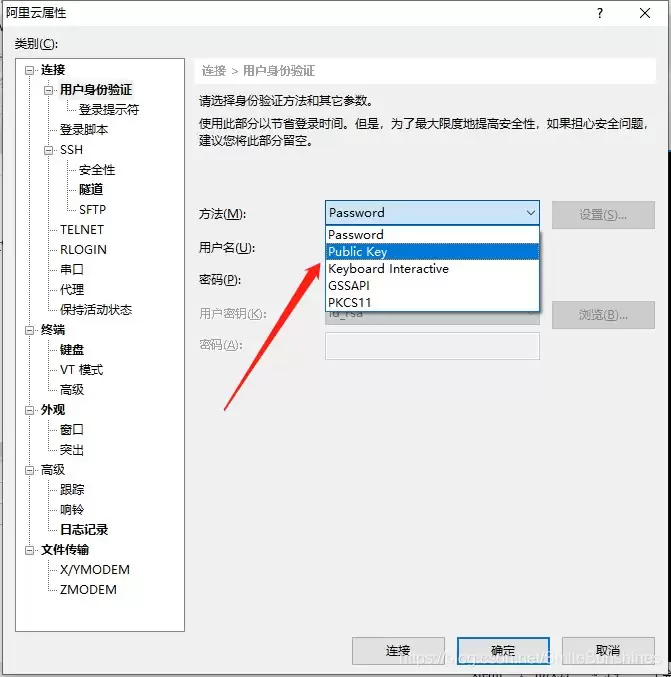
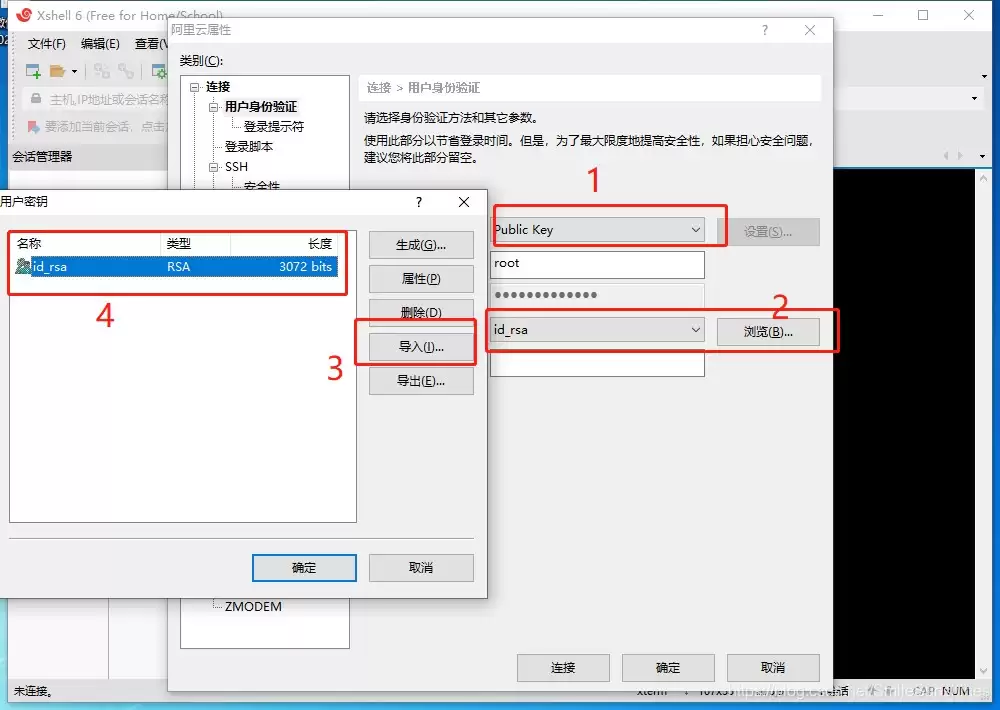
将私钥/root/.ssh/id_rsa下载到本地进行测试,以XShell为例在管理中把验证方法改成Key:
依次点击用户密钥后的浏览、导入并选择刚刚下载的id_rsa文件,选中后点击确定即可(密码即密钥密码)
5. 总结
以上为个人经验,希望能给大家一个参考,也希望大家多多支持本站。
您可能感兴趣的文章:- Linux防止SSH暴力破解的多种方法
- Linux服务器配置SSH服务登录失败的解决方案
- 如何修改Linux系统的/etc/ssh/sshd_config权限
- linux添加子用户并给予root权限,ssh私钥登录方式
- Linux开启SSH服务实现方式
- linux ssh如何实现增加访问端口
- Linux ssh-keygen系列命令与ssh命令的使用详解
相关文章
- 基于Ollama本地搭建OpenClaw私人助手的实现方式步骤实用指南 10-03
- starwave:AI Agent 工具实践指南 10-03
- Paper2Seminar:AI Agent 工具实践指南 10-03
- PromptSkill4image:实践指南 10-03
- pishi-normalno:AI Agent 工具实践指南 10-03
- contract-review:实践指南 10-03