




最新下载


热门教程
- 1
- 2
- 3
- 4
- 5
- 6
- 7
- 8
- 9
- 10
css如何实现悬浮客服效果 css实现悬浮客服效果代码
时间:2022-06-25 14:11:10 编辑:袖梨 来源:一聚教程网
本篇文章小编给大家分享一下css实现悬浮客服效果代码,小编觉得挺不错的,现在分享给大家供大家参考,有需要的小伙伴们可以来看看。
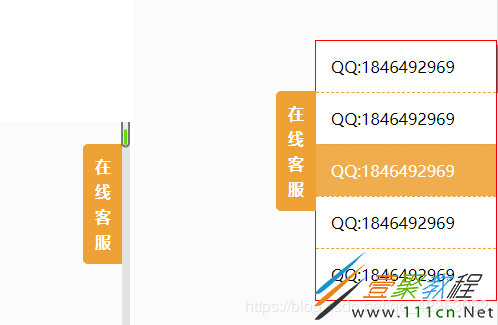
代码如下:
在线客服
- QQ:1846492969
- QQ:1846492969
- QQ:1846492969
- QQ:1846492969
- QQ:1846492969
.sideBar {
 position:fixed;
 right:-182px;
 top:50px;
 background-color:#ffffff;
 border:#eea236 solid 1px;
 transition:right 0.5s;
 border:solid 1px red;
}
.sideBar:hover {
 right:0;
}
.sideBar>div {
 position:relative;
}
.sideBar .tips {
 position:absolute;

 line-
 background-color:#eea236;

 left:-40px;
 top:50px;
 text-align:center;
 box-sizing:border-box;
 padding:10px 10px;
 border-top-left-radius:5px;
 border-bottom-left-radius:5px;
 font-weight:bold;
 color:#ffffff;
}
.sideBar .list {
 padding:0;
 list-style:none;

 margin:0;
}
.sideBar .list>li {
 padding:15px;
 border-top:#eea236 dashed 1px;
}
.sideBar .list>li:hover {
 background-color:#f0ad4e;
 color:#ffffff;
}
.sideBar .list>li:first-child {
 border-top:none;
}
相关文章
- 漫蛙漫画官方入口-漫蛙漫画在线免费观看官网 10-27
- poki小游戏在线入口-poki免费游戏大全 10-27
- 豆包网页版入口官网-豆包官网网址入口 10-27
- 红果短剧官网在线入口-红果剧场高清网页版下载观看 10-27
- 剪映网页版登录-剪映官网入口直达 10-27
- 即梦官网网页版入口-即梦AI官方登录入口 10-27