




最新下载


热门教程
- 1
- 2
- 3
- 4
- 5
- 6
- 7
- 8
- 9
- 10
Swift3.0 GCD定时器的使用DEMO
时间:2022-06-26 06:06:04 编辑:袖梨 来源:一聚教程网
| 代码如下 | 复制代码 |
| 直接看主要代码 //截止日期 let endDate = datePicker.date //开始日期 let startDate = Date() //时间间隔 let timeInterval:TimeInterval = endDate.timeIntervalSince(startDate) iftimer == nil { //剩余时间 var timeout = timeInterval iftimeout !=0{ //创建全局队列 let queue = DispatchQueue.global() //在全局队列下创建一个时间源 timer = DispatchSource.makeTimerSource(flags: [], queue: queue) //设定循环的间隔是一秒,并且立即开始 timer?.scheduleRepeating(wallDeadline: DispatchWallTime.now(), interval: .seconds(1)) //时间源出发事件 timer?.setEventHandler(handler: { //必须是当前日期往后的日期,在datePicker上也做了限制 iftimeout <=0{ self.timer?.cancel() self.timer = nil DispatchQueue.main.async(execute: { self.day.text ="00" self.hour.text ="00" self.minute.text ="00" self.second.text ="00" }) }else{ //计算剩余时间 let days = Int(timeout) / (3600*24) ifdays ==0{ self.day.text ="" } let hours = (Int(timeout) - Int(days) *24*3600) /3600 let minutes = (Int(timeout) - Int(days) *24*3600- Int(hours) *3600) /60 let seconds = Int(timeout) - Int(days) *24*3600- Int(hours) *3600- Int(minutes) *60 //主队列中刷新UI DispatchQueue.main.async(execute: { ifdays ==0{ self.day.text ="0" }else{ self.day.text ="(days)" } ifhours<10{ self.hour.text ="0"+"(hours)" }else{ self.hour.text ="(hours)" } ifminutes<10{ self.minute.text ="0"+"(minutes)" }else{ self.minute.text ="(minutes)" } ifseconds<10{ self.second.text ="0"+"(seconds)" }else{ self.second.text ="(seconds)" } }) timeout -=1 } }) //启动时间源 timer?.resume() } } | |
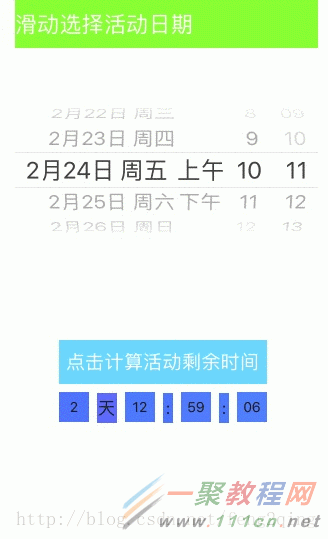
DEMO效果图
相关文章
- mcjs网页版即点即玩-mcjs极速秒玩入口 10-23
- 超星学习通网页版登录-超星学习通官网入口 10-23
- poki免费游戏大全-poki免费游戏在线畅玩入口 10-23
- mc.js官方在线入口 10-23
- 海角haijiao社区2025全新网址一键直达-海角社区最新官方入口地址 10-23
- 王者荣耀世界体力上限与恢复方法详解 王者荣耀世界体力机制全面解析 10-20