




最新下载








热门教程
- 1
- 2
- 3
- 4
- 5
- 6
- 7
- 8
- 9
- 10
Flutter布局模型之层叠定位
时间:2022-06-25 22:48:44 编辑:袖梨 来源:一聚教程网
Stack即层叠布局控件,能够将子控件层叠排列。
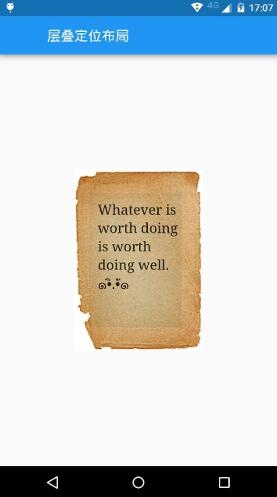
Stack控件的每一个子控件都是定位或不定位,定位的子控件是被Positioned控件包裹的。Stack控件本身包含所有不定位的子控件,其根据alignment定位(默认为左上角)。然后根据定位的子控件的top、right、bottom和left属性将它们放置在Stack控件上。
import 'package:flutter/material.dart';
class LayoutDemo extends StatelessWidget {
 @override
 Widget build(BuildContext context) {
  return new Scaffold(
   appBar: new AppBar(
    title: new Text('层叠定位布局'),
   ),
   body:new Center(
    child: new Stack(
     children: [
      new Image.network('http://img2.*c*xtu*ku.com/00/13/12/s97783873391.jpg'),
      new Positioned(
       left: 35.0,
       right: 35.0,
       top: 45.0,
       child: new Text(
        'Whatever is worth doing is worth doing well. ๑•ิ.•ั๑',
        style: new TextStyle(
         fontSize: 20.0,
         fontFamily: 'serif',
        ),
       ),
      ),
     ]
    ),
   ),
  );
 }
}
void main() {
 runApp(
  new MaterialApp(
   title: 'Flutter教程',
   home: new LayoutDemo(),
  ),
 );
}
相关文章
- 植物大战僵尸杂交版金盏吸金磁能力解析 07-26
- 异梦残响晏景明详细介绍 异梦残响晏景明属性技能 07-26
- 逆战未来怪物血条数值详解 07-26
- 原神6.3奇馈宝箱位置在哪 奇馈宝箱位置大全 07-26
- 逆战未来新手游戏界面设置指南 07-26
- 鹅鸭杀地图及模式解锁问答一览 07-26