




最新下载


热门教程
- 1
- 2
- 3
- 4
- 5
- 6
- 7
- 8
- 9
- 10
Android实现Service在前台运行服务
时间:2022-06-25 23:10:17 编辑:袖梨 来源:一聚教程网
前言
在做手机音乐播放器的时候,让我非常苦恼的一件事就是手机有清理内存的软件,比如百度,360等等,一点击清理音乐就停止播放了,去后台查看发现Service已经被停止并重新启动了,这显然不是我想要的,我希望音乐能够在后台播放,并且自己能控制什么时候退出,不想让系统给我清理了,就像酷狗一直在通知栏显示那样,于是我就知道了在前台运行的服务。
实现
我们先看一下结果图:
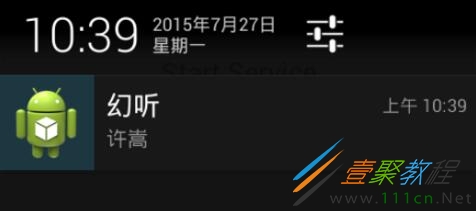
这是运行在通知栏的界面,这样就是让服务在前台运行,再清理的时候就不会导致服务被关闭了。
好了,我们直接上代码,因为要开启服务,所以我们必须先要有一个Service的子类,然后在onCreate里面实现它。
MyService.java
public class MyService extends Service {

 public static final String TAG = "MyService";

 @Override
 public void onCreate() {
  super.onCreate();
  Notification notification = new Notification(R.drawable.ic_launcher,
    "有通知到来", System.currentTimeMillis());
  Intent notificationIntent = new Intent(this, MainActivity.class);
  PendingIntent pendingIntent = PendingIntent.getActivity(this, 0,
    notificationIntent, 0);
  notification.setLatestEventInfo(this, "幻听", "许嵩",
    pendingIntent);
  startForeground(1, notification);

 }
 @Override
 public int onStartCommand(Intent intent, int flags, int startId) {
  return super.onStartCommand(intent, flags, startId);
 }

 @Override
 public void onDestroy() {
  super.onDestroy();
 }

 @Override
 public IBinder onBind(Intent intent) {
  return null;
 }

}
可以看到,在onCreate方法里面我们得到Notification的一个对象,然后调用startForeground(1, notification);方法来实现在前台运行。如果想要退出只需要退出服务即可。
小结
在前台运行服务是十分有用的,特别是在做播放器开发的时候,如果只是简单的清理一下音乐就退出播放了,这是很不能容忍的。
像酷狗一样,在通知栏有自己Notification的自定义界面,下一篇文章我说明如何自定义Notification的界面。
相关文章
- TPLink TLWDR8620 52 无线路由器映射服务器到外网操作方法 09-03
- 本地使用docker搭建minio 09-03
- 《我的勇者》勇者启程玩法说明 09-03
- 《我的勇者》阿兔回归礼包兑换码分享 09-03
- 简单聊聊缓存雪崩、穿透、击穿 09-03
- u深度U盘修复硬盘操作步骤 09-03