




最新下载


热门教程
- 1
- 2
- 3
- 4
- 5
- 6
- 7
- 8
- 9
- 10
解决mysql服务启动失败:Theinnodb_systemdatafileibdata1mustbewritable问题
时间:2026-07-20 16:52:57 编辑:袖梨 来源:一聚教程网
解决mysql服务启动失败问题
mysql服务启动失败,查看/var/log/mysql/error.log文件发现如下错误:
[ERROR] InnoDB: The innodb_system data file 'ibdata1' must be writable
[ERROR] InnoDB: The innodb_system data file 'ibdata1' must be writable
[ERROR] InnoDB: Plugin initialization aborted with error Generic error
[ERROR] Plugin 'InnoDB' init function returned error.
[ERROR] Plugin 'InnoDB' registration as a STORAGE ENGINE failed.
[ERROR] Failed to initialize builtin plugins.
[ERROR] Aborting

试了网上的修改文件目录权限、删除ib_logfile文件都没用。
最终解决办法
1. 进入/etc/apparmor.d目录
2. 修改usr.sbin.mysqld文件内容,文件中加上如下两行内容(路径根据自己mysql数据库实际目录确定)
/var/lib/mysql/ r,/var/lib/mysql/** rwk,
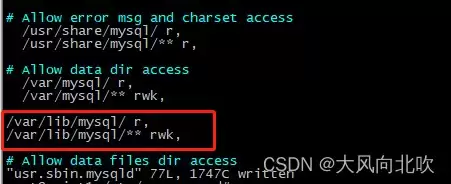
3. 重启apparmor和mysql服务
systemctl restart apparmorsystemctl restart mysql.service
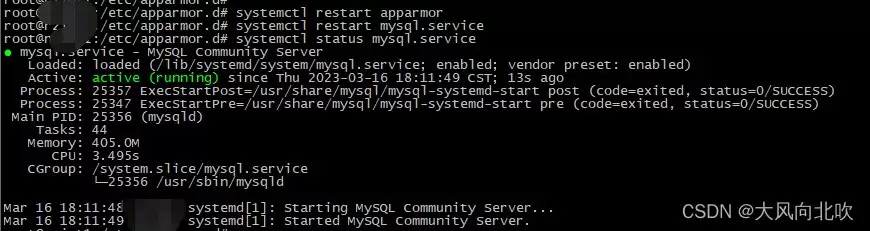
问题解决!
总结
以上为个人经验,希望能给大家一个参考,也希望大家多多支持本站。
您可能感兴趣的文章:- 解决Docker磁盘空间不足导致MySQL启动失败问题
- MySQL启动失败(code=exited, status=1FAILURE)异常定位及解决方案
- MySQL启动失败及权限问题的解决方案分享
- 如何解决MySQL服务启动失败ERROR 2003:10061问题
- docker启动MySQL容器失败原因分析以及排查记录
- MySQL启动失败报错:mysqld.service failed to run ‘start-pre‘ task的问题分析与解决方案
- MySQL 启动失败(code=exited, status=1/FAILURE)异常解决方案
相关文章
- 三角洲云游戏网页版极速畅玩-三角洲云游戏一键秒玩入口 11-02
- Windows 11 如何永久禁用会自动重启的 SearchHost.exe? 11-02
- 漫蛙manwa2链接入口-漫蛙manwa2网页直达入口 11-02
- jm漫画天堂-禁漫成人隐藏入口 11-02
- AO3镜像站合集-10个实测可用AO3入口网址速存 11-02
- pixiv网页版手机入口-pixiv手机网页登录入口 11-02