




最新下载


热门教程
- 1
- 2
- 3
- 4
- 5
- 6
- 7
- 8
- 9
- 10
Python: 为 Vole 机器语言实现图形化界面
时间:2026-07-19 09:03:57 编辑:袖梨 来源:一聚教程网
背景
计算机科学概论 一书中提到了 这种机器语言。由于这个这种语言的指令比较简单,我想到可以用图形化界面来展示 指令的执行效果。示例效果如下 ⬇️
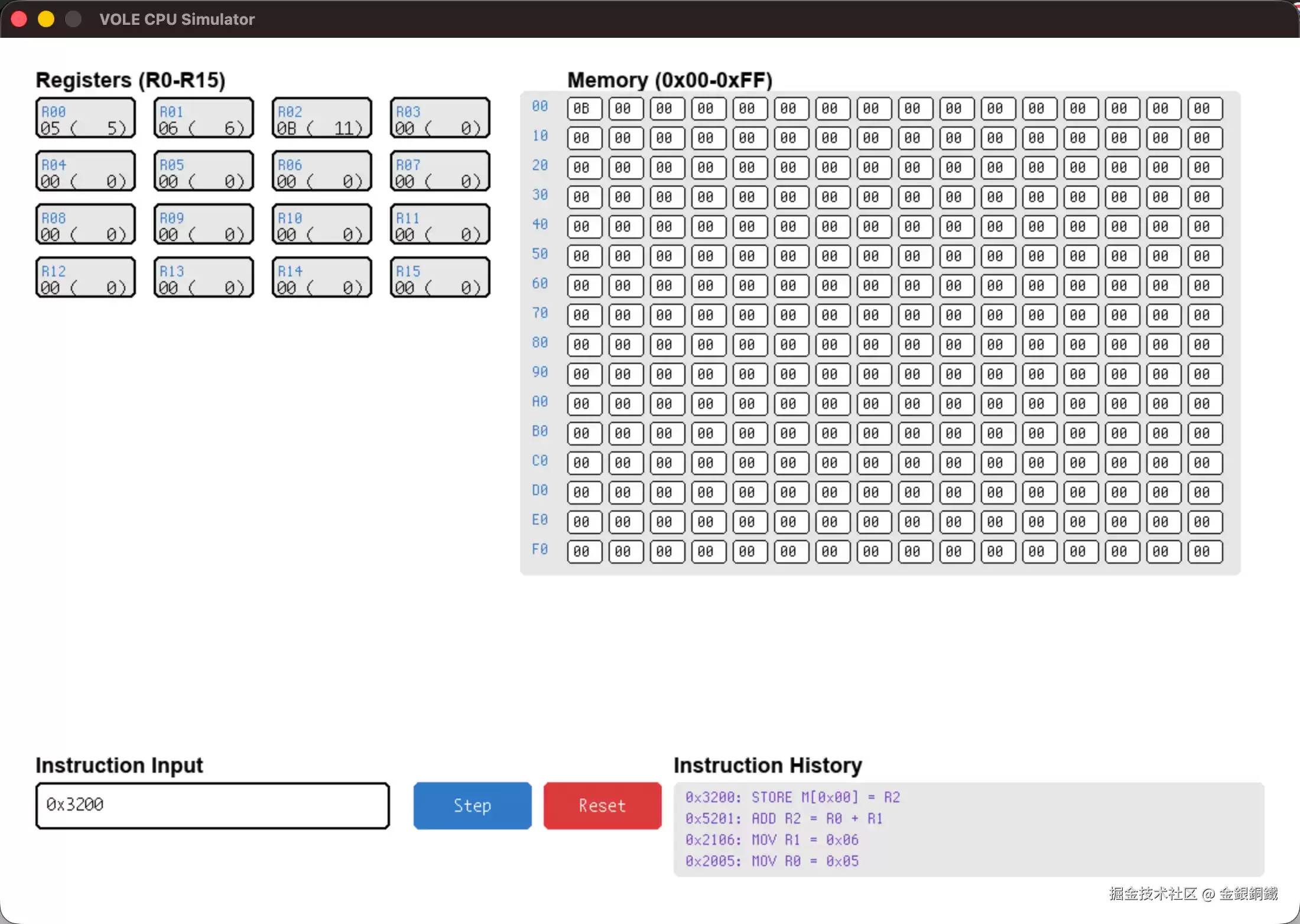
本文会提供 的简介和相关代码
正文
基本信息
所对应的机器的体系结构如下
- 有 个通用寄存器(),编号为 。每个寄存器的长度为 字节( 位)
- 机器内存()共有 个 (地址空间从 到 ),每个 可以存储 字节
语言的指令长度总是 字节(共 位)。前 位是 ,后 位用于表示 。 共有 种 ⬇️
| 作用 | ||
|---|---|---|
| 将地址为 的 中的内容复制到寄存器 中。 例子: 指令会将地址为 的 中的内容复制到寄存器 中 | ||
| 将值 保存到寄存器 中。 例子: 指令会将 保存到寄存器 里 | ||
| 将寄存器 中的值复制到地址为 的 中。 例子: 指令会将寄存器 的值复制到地址为 的 中 | ||
| 将寄存器 的值复制到寄存器 中。 例子: 指令会将寄存器 的值复制到寄存器 中 | ||
| 将寄存器 和寄存器 中的值相加(用 的方式),并将结果保存到寄存器 中。 例子: 指令会将寄存器 与寄存器 的值的和保存到寄存器 中 | ||
| 将寄存器 和寄存器 中的值相加(将两者的值视为浮点数),并将结果保存到寄存器 中。 例子: 指令会将寄存器 与寄存器 的值(两个值都被视为浮点数)的和保存到寄存器 中 | ||
| 对寄存器 和寄存器 中的值进行 运算,将计算结果保存到寄存器 中。 例子: 指令会对寄存器 与寄存器 的值进行 运算,并将计算结果保存到寄存器 中 | ||
| 对寄存器 和寄存器 中的值进行 运算,将计算结果保存到寄存器 中。 例子: 指令会对寄存器 与寄存器 的值进行 运算,并将计算结果保存到寄存器 中 | ||
| 对寄存器 和寄存器 中的值进行 运算,将计算结果保存到寄存器 中。 例子: 指令会对寄存器 与寄存器 的值进行 运算,并将计算结果保存到寄存器 中 | ||
| 对寄存器 中的值执行 次循环右移操作。 例子: 指令会对寄存器 的值执行 次循环右移操作 | ||
| 如果寄存器 的值和寄存器 的值相等,则跳转执行地址为 的 处的指令。 例子: 指令会检查寄存器 和寄存器 的值是否相等。如果两者相等,则将程序计数器的值设置为 (这样的话, 处的指令就会成为下一条指令)。如果两者不相等,不用做任何事情,程序会按照正常的流程继续下去 | ||
| 停止执行。 例子: 指令会让程序停止 |
实现基本功能
基于上述介绍,我们可以用 来模拟 指令的执行过程。请注意,以下功能我没有实现
- 浮点数加法: 涉及 为 的那些指令
- 程序计数器: 涉及 为 的那些指令
- 停止执行: 涉及 为 的指令
排除掉上述 个功能后,我实现了可以模拟执行剩余指令的 程序 (trae 提供了一些帮助) ⬇️
 复制代码
class Register:
    def __init__(self):
        self.value = 0    def load(self, value):
        if value < -128 or value > 127:
            raise ValueError("Value must be in range [-128, 127]")
        self.value = value

    def __repr__(self):
        return f"Register(value={self.value})"class Memory:
    def __init__(self, size):
        self.cells = [0] * size
        self.size = size

    def read(self, address):
        if address < 0 or address > self.size - 1:
            raise ValueError(f"Address must be in range [0, {self.size - 1}]")
        return self.cells[address]

    def store(self, address, value):
        if address < 0 or address > self.size - 1:
            raise ValueError(f"Address must be in range [0, {self.size - 1}]")
        if value < -128 or value > 127:
            raise ValueError("Value must be in range [-128, 127]")
        self.cells[address] = value

    def __repr__(self):
        return f"Memory(size={self.size})"class CPU:
    def __init__(self):
        self.registers = [Register() for _ in range(16)]
        self.memory = Memory(256)    def adjust_value(self, value):
        if value > 127:
            value -= 256
        return value

    def to_non_negative(self, value):
        if value < 0:
            value += 256
        return value

    def to_bits(self, value):
        if value < 0 or value >= 256:
            raise ValueError("Value must be in range [0, 255]")
        return [(value >> i) & 1 for i in range(8)][::-1]    def to_int(self, bits):
        return int("".join(map(str, bits)), 2)    def extract_opcode(self, instruction):
        return instruction >> 12    def extract_operand1(self, instruction):
        return (instruction >> 8) & 0x0F    def extract_operand2(self, instruction):
        return (instruction >> 4) & 0x0F    def extract_operand3(self, instruction):
        return instruction & 0x0F    def extract_operand2and3(self, instruction):
        return instruction & 0xFF    def extract_r_xy(self, instruction):
        return (
            self.extract_operand1(instruction),
            self.extract_operand2and3(instruction)
        )    def extract_r_s_t(self, instruction):
        return (
            self.extract_operand1(instruction),
            self.extract_operand2(instruction),
            self.extract_operand3(instruction)
        )

    def bitwise_operation(self, r, s, t, operator):
        s_value = self.to_non_negative(self.registers[s].value)
        t_value = self.to_non_negative(self.registers[t].value)
        self.registers[r].load(self.adjust_value(operator(s_value, t_value)))    def run(self, instruction):
        opcode = self.extract_opcode(instruction)
        if opcode == 1:
            # 0x1: RXY
            # R=M[XY]
            r, xy = self.extract_r_xy(instruction)
            self.registers[r].load(self.memory.read(xy))
        elif opcode == 2:
            # 0x2: RXY
            # R=XY
            r, xy = self.extract_r_xy(instruction)
            self.registers[r].load(self.adjust_value(xy))
        elif opcode == 3:
            # 0x3: RXY
            # M[XY]=R
            r, xy = self.extract_r_xy(instruction)
            self.memory.store(xy, self.registers[r].value)
        elif opcode == 4:
            # 0x4: 0RS
            # R[S]=R[R]
            if self.extract_operand1(instruction) != 0:
                raise ValueError("Instruction format error!")
            r = self.extract_operand2(instruction)
            s = self.extract_operand3(instruction)
            self.registers[s].load(self.registers[r].value)
        elif opcode == 5:
            # 0x5: RST
            # R[R]=R[S]+R[T] (with 2's complement arithmetic)
            r, s, t = self.extract_r_s_t(instruction)
            result = self.registers[s].value + self.registers[t].value
            if result > 127:
                result -= 256
            if result < -128:
                result += 256
            self.registers[r].load(result)
        elif opcode == 6:
            # 0x6: RST
            # I don't know how to implement floating-point arithmetic (yet)
            raise ValueError("Not implemented yet!")
        elif opcode == 7:
            # 0x7: RST
            # R[R] = R[S] | R[T]
            r, s, t = self.extract_r_s_t(instruction)
            self.bitwise_operation(r, s, t, lambda a, b: a | b)
        elif opcode == 8:
            # 0x8: RST
            # R[R] = R[S] & R[T]
            r, s, t = self.extract_r_s_t(instruction)
            self.bitwise_operation(r, s, t, lambda a, b: a & b)
        elif opcode == 9:
            # 0x9: RST
            # R[R] = R[S] ^ R[T]
            r, s, t = self.extract_r_s_t(instruction)
            self.bitwise_operation(r, s, t, lambda a, b: a ^ b)
        elif opcode == 0xA:
            # 0xA: R0X
            # Rotate R[R] right by X bits
            if self.extract_operand2(instruction) != 0:
                raise ValueError("Instruction format error!")
            r = self.extract_operand1(instruction)
            x = self.extract_operand3(instruction)
            r_value = self.to_non_negative(self.registers[r].value)
            x_value = self.to_non_negative(x) % 8
            bits = self.to_bits(r_value)
            raw = (bits + bits)[x_value:(x_value + 8)]
            self.registers[r].load(self.adjust_value(self.to_int(raw)))
        elif opcode in [0xB, 0xC]:
            raise ValueError("Not implemented yet!")
        else:
            raise ValueError("Invalid opcode")
请将上述代码保存为
添加图形化界面
在 所提供的代码的基础上,我让 trae 帮忙生成了支持图形化界面的代码 ⬇️
 复制代码import pygame
from vole import CPU# ===================== 基础配置 =====================
pygame.init()WIDTH, HEIGHT = 1100, 750
screen = pygame.display.set_mode((WIDTH, HEIGHT))
pygame.display.set_caption("VOLE CPU Simulator")WHITE = (255, 255, 255)
BLACK = (0, 0, 0)
GRAY = (180, 180, 180)
LIGHT_GRAY = (230, 230, 230)
DARK_GRAY = (100, 100, 100)
BLUE = (50, 120, 200)
RED = (220, 60, 60)
GREEN = (60, 180, 60)
YELLOW = (255, 220, 80)
PURPLE = (120, 60, 200)font = pygame.font.SysFont("Monaco", 14)
font_small = pygame.font.SysFont("Monaco", 12)
font_title = pygame.font.SysFont("Arial", 18, bold=True)# ===================== 游戏数据 =====================
cpu = CPU()
input_text = ""
error_msg = ""
instruction_history = []
MAX_HISTORY = 10# ===================== 辅助函数 =====================
def decode_instruction(instruction):
    opcode = instruction >> 12
    if opcode == 1:
        R = (instruction >> 8) & 0x0F
        XY = instruction & 0xFF
        return f"0x{instruction:04X}: LOAD R{R} = M[0x{XY:02X}]"
    elif opcode == 2:
        R = (instruction >> 8) & 0x0F
        XY = instruction & 0xFF
        return f"0x{instruction:04X}: MOV R{R} = 0x{XY:02X}"
    elif opcode == 3:
        R = (instruction >> 8) & 0x0F
        XY = instruction & 0xFF
        return f"0x{instruction:04X}: STORE M[0x{XY:02X}] = R{R}"
    elif opcode == 4:
        R = (instruction >> 4) & 0x0F
        S = instruction & 0x0F
        return f"0x{instruction:04X}: COPY R{S} = R{R}"
    elif opcode == 5:
        R = (instruction >> 8) & 0x0F
        S = (instruction >> 4) & 0x0F
        T = instruction & 0x0F
        return f"0x{instruction:04X}: ADD R{R} = R{S} + R{T}"
    elif opcode == 7:
        R = (instruction >> 8) & 0x0F
        S = (instruction >> 4) & 0x0F
        T = instruction & 0x0F
        return f"0x{instruction:04X}: OR R{R} = R{S} | R{T}"
    elif opcode == 8:
        R = (instruction >> 8) & 0x0F
        S = (instruction >> 4) & 0x0F
        T = instruction & 0x0F
        return f"0x{instruction:04X}: AND R{R} = R{S} & R{T}"
    elif opcode == 9:
        R = (instruction >> 8) & 0x0F
        S = (instruction >> 4) & 0x0F
        T = instruction & 0x0F
        return f"0x{instruction:04X}: XOR R{R} = R{S} ^ R{T}"
    elif opcode == 0xA:
        R = (instruction >> 8) & 0x0F
        X = instruction & 0x0F
        return f"0x{instruction:04X}: ROTATE R{R} right {X} times"
    elif opcode in [6, 0xB, 0xC]:
        return f"0x{instruction:04X}: OPCODE {opcode} - Not implemented"
    else:
        return f"0x{instruction:04X}: Invalid opcode"def execute_instruction(hex_str):
    global error_msg, instruction_history
    if len(hex_str) == 4:
        try:
            instruction = int(hex_str, 16)
            cpu.run(instruction)
            decoded = decode_instruction(instruction)
            instruction_history.insert(0, decoded)
            if len(instruction_history) > MAX_HISTORY:
                instruction_history.pop()
            error_msg = ""
            return True
        except ValueError as e:
            error_msg = str(e)
            return False
    else:
        error_msg = "Please enter exactly 4 hex digits"
        return Falsedef reset_cpu():
    global cpu, input_text, error_msg, instruction_history
    cpu = CPU()
    input_text = ""
    error_msg = ""
    instruction_history = []# ===================== 绘制函数 =====================
def draw_registers():
    x, y = 30, 50

    title = font_title.render("Registers (R0-RF)", True, BLACK)
    screen.blit(title, (x, y - 25))

    for i in range(16):
        rx = x + (i % 4) * 100
        ry = y + (i // 4) * 45

        val = cpu.registers[i].value
        if val >= 0:
            hex_val = f"{val:02X}"
        else:
            hex_val = f"{val & 0xFF:02X}"

        pygame.draw.rect(screen, LIGHT_GRAY, (rx, ry, 85, 35), border_radius=5)
        pygame.draw.rect(screen, BLACK, (rx, ry, 85, 35), 2, border_radius=5)

        name = font_small.render(f"R{i:X}", True, BLUE)
        screen.blit(name, (rx + 5, ry + 5))

        value = font.render(f"{hex_val} ({val:4d})", True, BLACK)
        screen.blit(value, (rx + 5, ry + 18))def draw_memory():
    x, y = 480, 50

    title = font_title.render("Memory (0x00-0xFF)", True, BLACK)
    screen.blit(title, (x, y - 25))

    pygame.draw.rect(screen, LIGHT_GRAY, (x - 40, y - 5, 610, 410), border_radius=5)

    for row in range(16):
        addr_label = font_small.render(f"{row*16:02X}", True, BLUE)
        screen.blit(addr_label, (x - 30, y + row * 25))

        for col in range(16):
            addr = row * 16 + col
            val = cpu.memory.read(addr)

            if val >= 0:
                hex_val = f"{val:02X}"
            else:
                hex_val = f"{val & 0xFF:02X}"

            mx = x + col * 35
            my = y + row * 25

            pygame.draw.rect(screen, WHITE, (mx, my, 30, 20), border_radius=3)
            pygame.draw.rect(screen, BLACK, (mx, my, 30, 20), 1, border_radius=3)

            value = font_small.render(hex_val, True, BLACK)
            screen.blit(value, (mx + 5, my + 2))def draw_input_area():
    x, y = 30, HEIGHT - 120

    title = font_title.render("Instruction Input", True, BLACK)
    screen.blit(title, (x, y - 25))

    pygame.draw.rect(screen, WHITE, (x, y, 300, 40), border_radius=5)
    pygame.draw.rect(screen, BLACK, (x, y, 300, 40), 2, border_radius=5)

    if input_text:
        text = font.render(f"0x{input_text}", True, BLACK)
    else:
        text = font.render("Enter 4-digit hex instruction...", True, GRAY)
    screen.blit(text, (x + 10, y + 10))

    step_btn = pygame.Rect(x + 320, y, 100, 40)
    pygame.draw.rect(screen, BLUE, step_btn, border_radius=5)
    step_text = font.render("Step", True, WHITE)
    screen.blit(step_text, (step_btn.centerx - step_text.get_width()//2, step_btn.centery - step_text.get_height()//2))

    reset_btn = pygame.Rect(x + 430, y, 100, 40)
    pygame.draw.rect(screen, RED, reset_btn, border_radius=5)
    reset_text = font.render("Reset", True, WHITE)
    screen.blit(reset_text, (reset_btn.centerx - reset_text.get_width()//2, reset_btn.centery - reset_text.get_height()//2))

    if error_msg:
        error_text = font.render(error_msg, True, RED)
        screen.blit(error_text, (x, y + 50))

    return step_btn, reset_btndef draw_instruction_history():
    x, y = 570, HEIGHT - 120

    title = font_title.render("Instruction History", True, BLACK)
    screen.blit(title, (x, y - 25))

    pygame.draw.rect(screen, LIGHT_GRAY, (x, y, 500, 80), border_radius=5)

    for i, entry in enumerate(instruction_history):
        text = font_small.render(entry, True, PURPLE)
        screen.blit(text, (x + 10, y + 5 + i * 18))def draw():
    screen.fill(WHITE)

    draw_registers()
    draw_memory()
    step_btn, reset_btn = draw_input_area()
    draw_instruction_history()

    pygame.display.flip()
    return step_btn, reset_btn# ===================== 主循环 =====================
running = True
while running:
    step_btn, reset_btn = draw()

    for event in pygame.event.get():
        if event.type == pygame.QUIT:
            running = False

        if event.type == pygame.KEYDOWN:
            if event.key == pygame.K_BACKSPACE:
                input_text = input_text[:-1]
                error_msg = ""
            elif event.key == pygame.K_RETURN:
                execute_instruction(input_text)
            elif len(input_text) < 4 and event.unicode in "0123456789ABCDEFabcdef":
                input_text = input_text.upper() + event.unicode.upper()
                error_msg = ""
            elif event.key == pygame.K_r and pygame.key.get_mods() & pygame.KMOD_CTRL:
                reset_cpu()

        if event.type == pygame.MOUSEBUTTONDOWN:
            mouse_pos = pygame.mouse.get_pos()
            if step_btn.collidepoint(mouse_pos):
                execute_instruction(input_text)
            elif reset_btn.collidepoint(mouse_pos):
                reset_cpu()pygame.quit()
请将以上代码保存为 。使用如下命令可以运行
复制代码python3 vole_gui.py
运行效果
运行 后,看到的初始界面会是这样 ⬇️
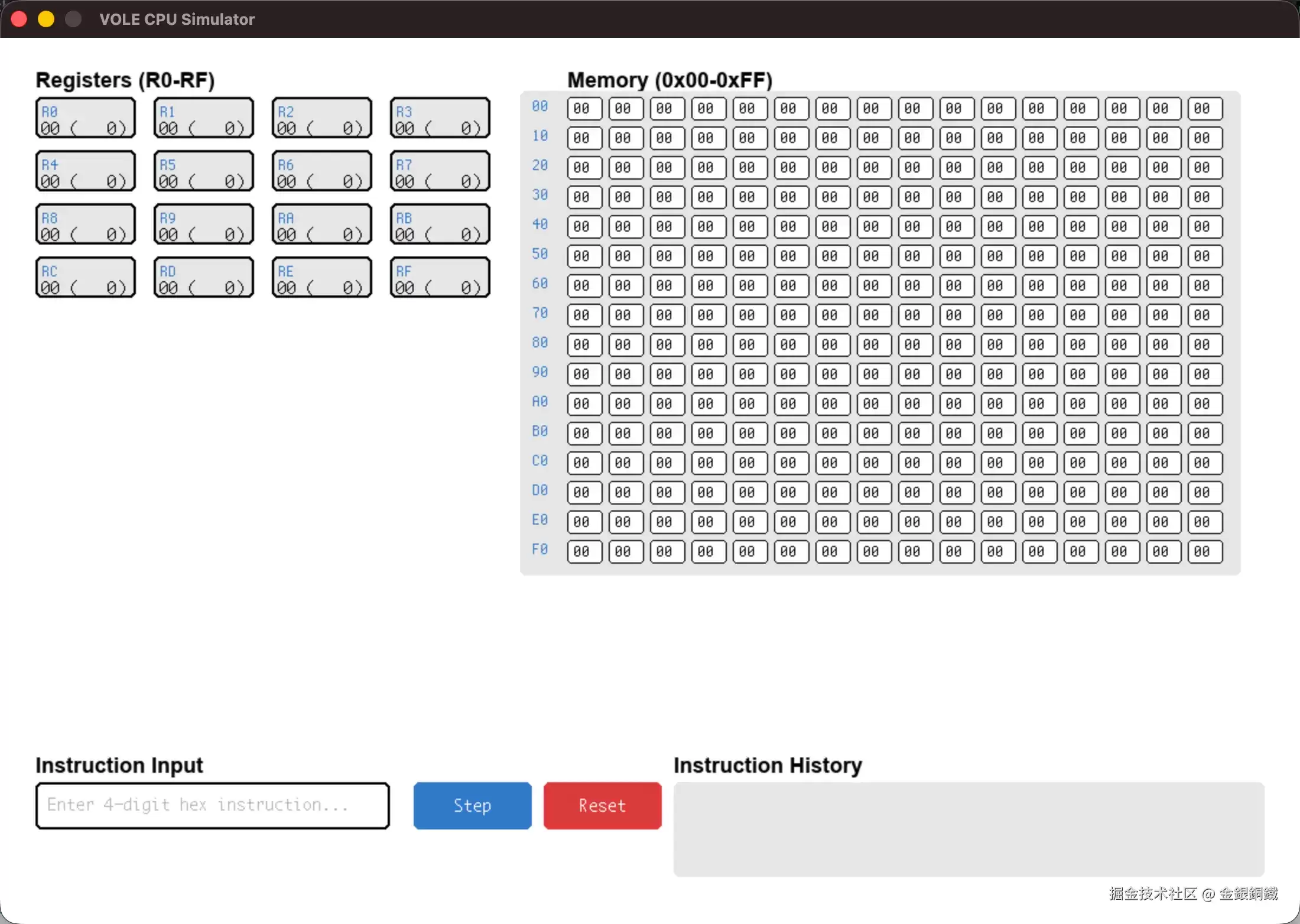
示例
以加法 为例,我们可以用以下 指令来完成
 复制代码0x2005 # 将字面值 5 保存到 0x0 寄存器中
0x2107 # 将字面值 7 保存到 0x1 寄存器中
0x5201 # 对寄存器 0x0 和寄存器 0x1 的值求和,计算结果(即,12)保存到寄存器 0x2 中
0x3200 # 将寄存器 0x2 的值(即,12)保存到地址为 0x00 的 cell 中
执行完 指令之后,效果如下图所示 ⬇️
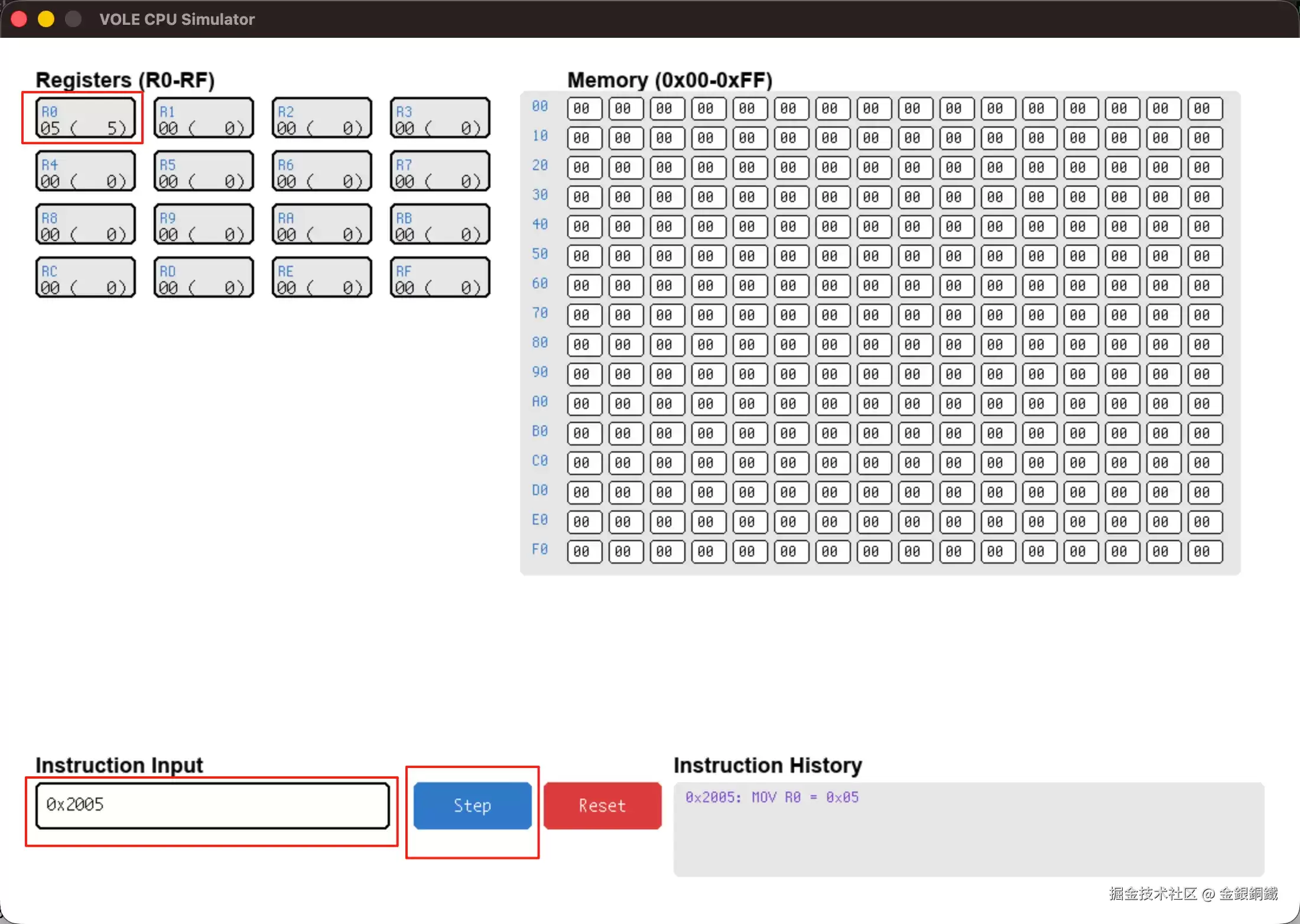
执行完 指令之后,效果如下图所示 ⬇️
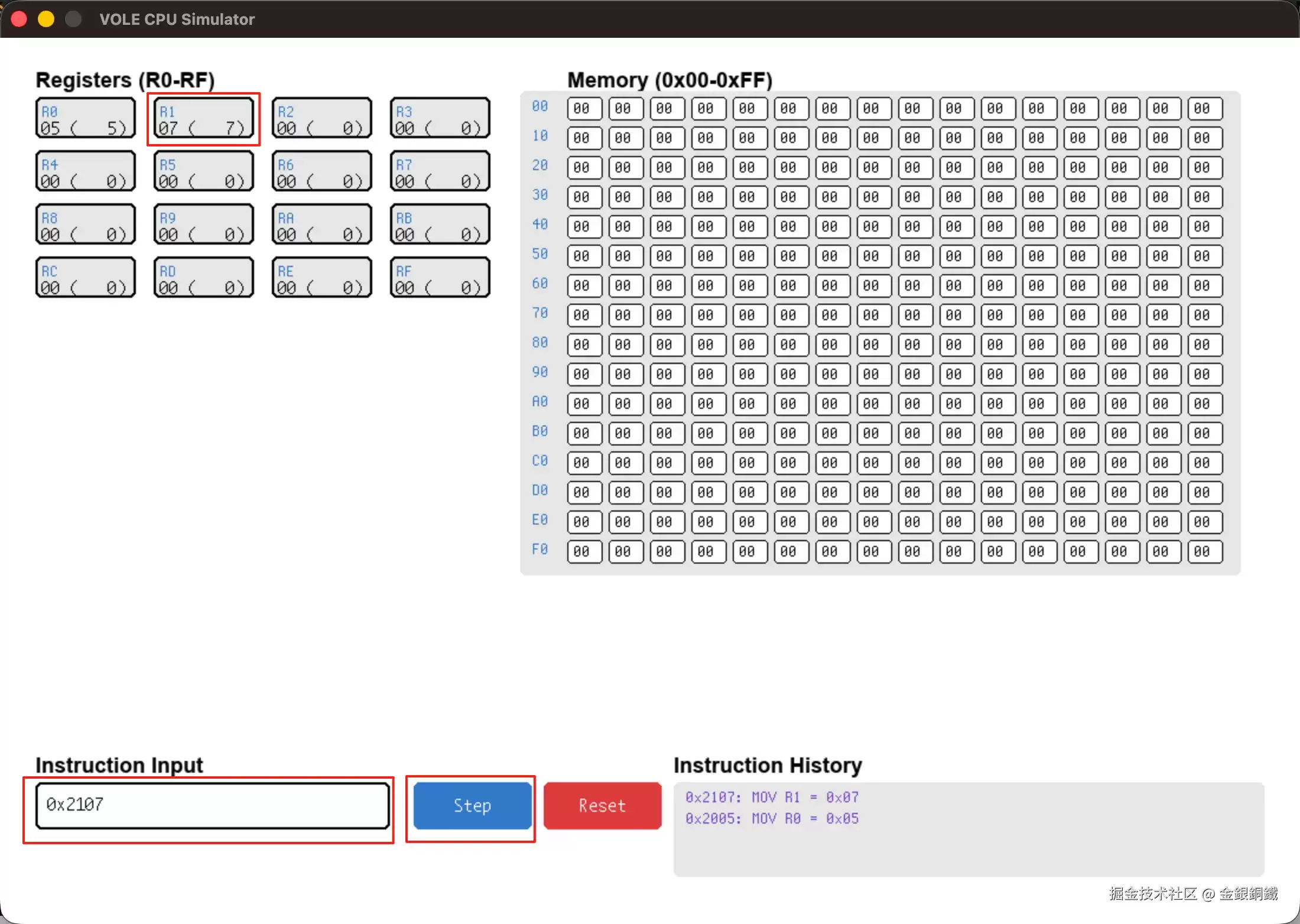
执行完 指令之后,效果如下图所示 ⬇️
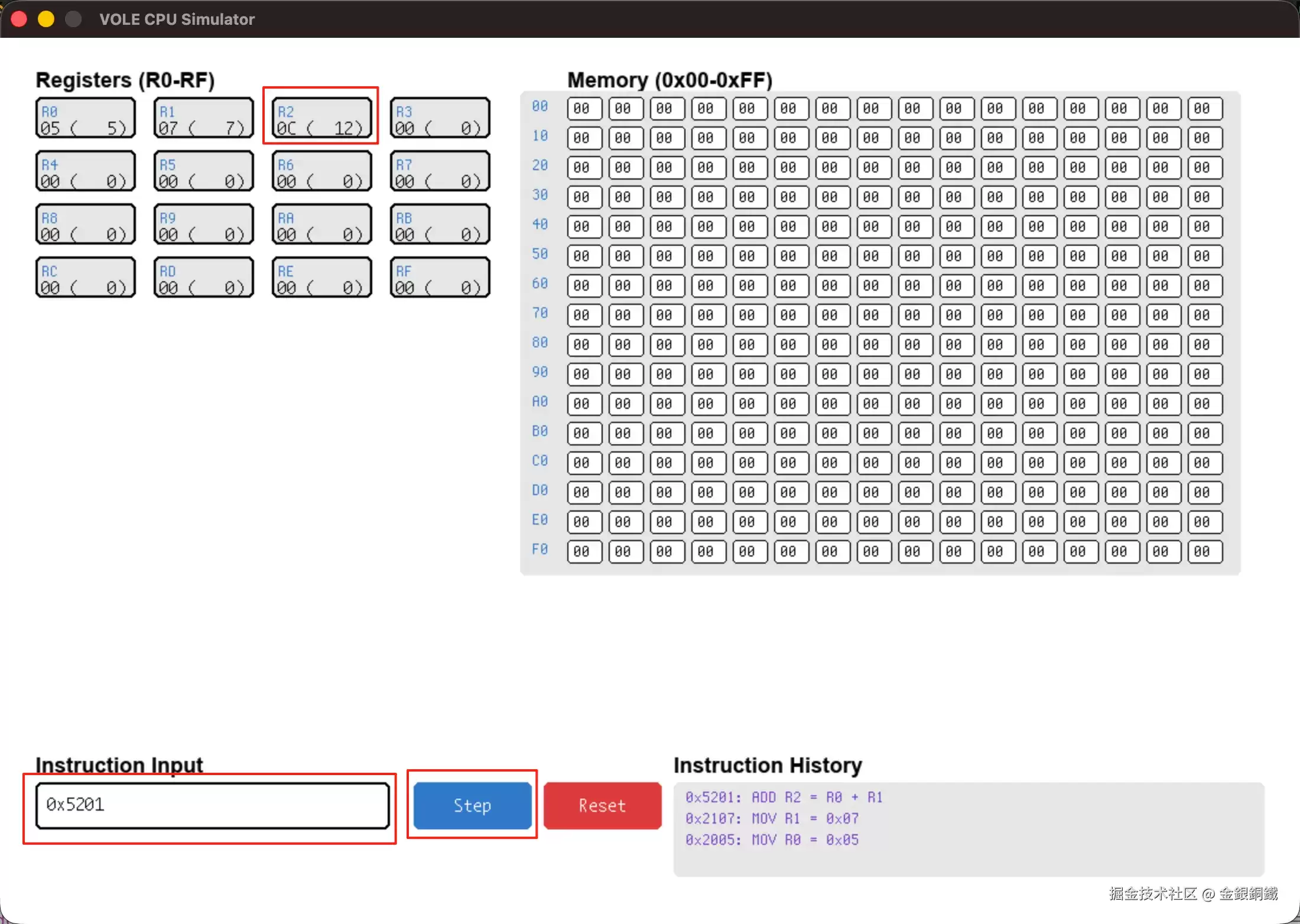
执行完 指令之后,效果如下图所示 ⬇️
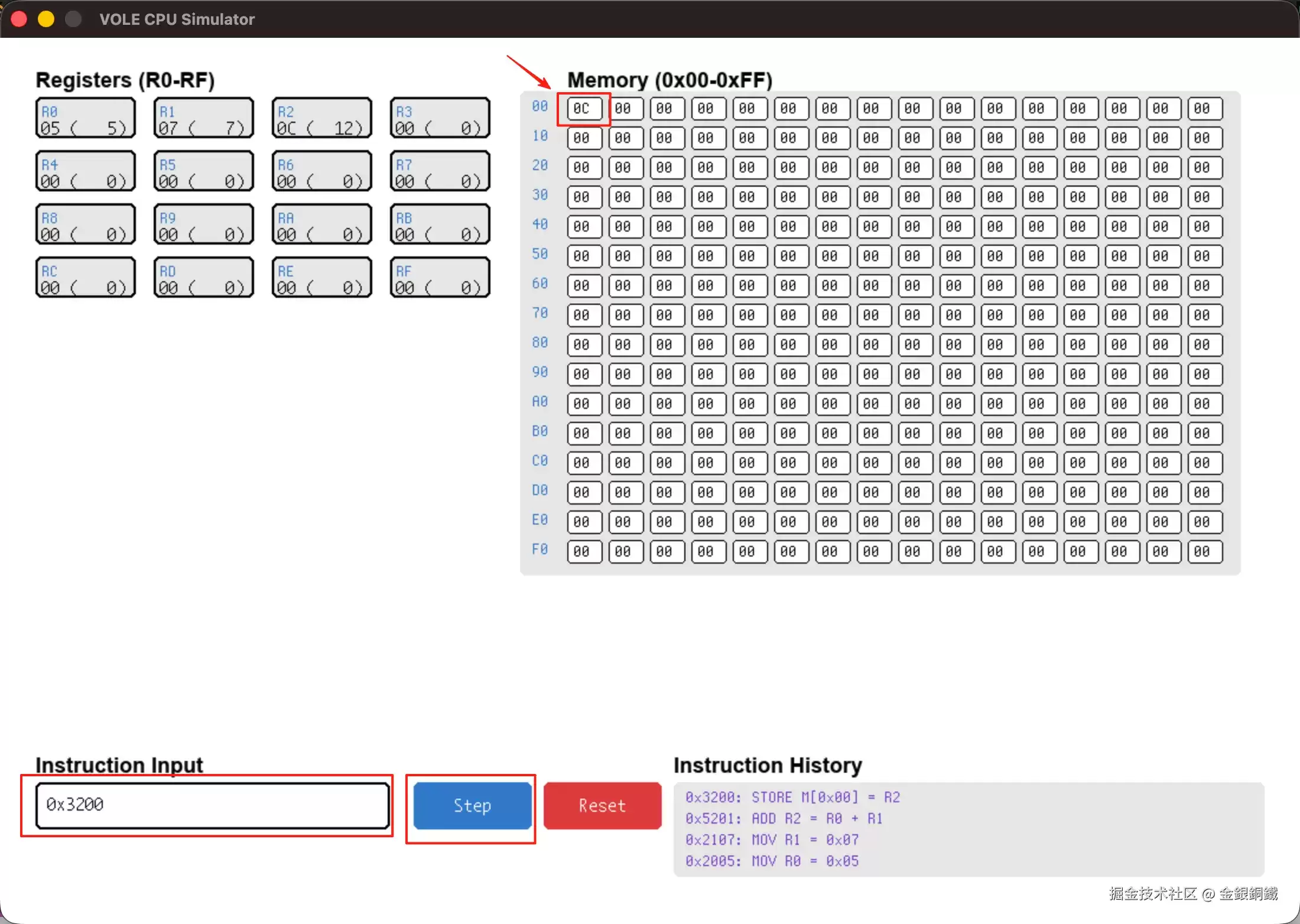
我们通过执行 指令,将 的和保存到了地址为 的 里,运行结果符合预期。
相关文章
- Ruby的面向对象方式编程学习杂记 09-23
- 解析proxy代理模式在Ruby设计模式开发中的运用 09-23
- 深入剖析Ruby设计模式编程中对命令模式的相关使用 09-23
- 详解组合模式的结构及其在Ruby设计模式编程中的运用 09-23
- 设计模式中的模板方法模式在Ruby中的应用实例两则 09-23
- 借助RubyGnome2库进行GTK下的Ruby GUI编程的基本方法 09-23