




最新下载


热门教程
- 1
- 2
- 3
- 4
- 5
- 6
- 7
- 8
- 9
- 10
【2021-1-5】QT与SQLsever数据库的数据管理系统
时间:2026-06-18 09:02:00 编辑:袖梨 来源:一聚教程网
QT+SQLsever数据库的数据管理系统
目录登录界面 统计图表制作 QT界面之间传递参数 左键点击tablevie后跳出菜单 点击表格在label上显示图片、下载、上传到数据库 保存widget为PDF 保存tableview为Excel lineedit美化,combo box 美化 作者有话说目录
该系统的功能有:图表显示,图像界面对数据的增删改查,界面跳转缓冲进度条,开机界面,角色管理等。
登录界面
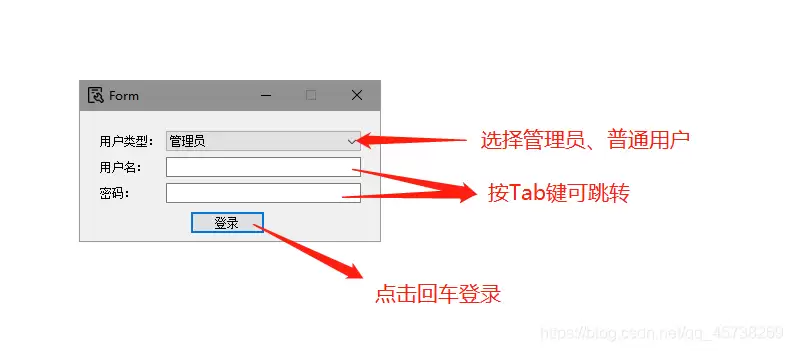
数据库连接:
/********************************数据库连接******************************/QSqlDatabase db=QSqlDatabase::addDatabase("QODBC");db.setDatabaseName(QString("DRIVER={SQL SERVER};" "SERVER=%1;" //服务器名称 "DATABASE=%2;"//数据库名 "UID=%3;"//登录名 "PWD=%4;"//密码 ).arg("……").arg("……").arg("……").arg("……")); if (!db.open()) {qDebug()<<"connect sql server failed!";//数据库登录失败时输出 }else {qDebug()<<"connect sql server successfully!";//数据库登录成功时输出 }
回车快捷键:
/************回车键按钮快捷键***********/ui->pushButton->setDefault(true);//按钮默认选中ui->pushButton->setShortcut(QKeySequence::InsertParagraphSeparator);//将小键盘回车键与登录按钮绑定在一起ui->pushButton->setShortcut(Qt::Key_Enter);//将字母区回车键与登录按钮绑定在一起ui->pushButton->setShortcut(Qt::Key_Return);//将小键盘回车键与登录按钮绑定在一起
窗口关闭询问是否退出:
#include <QCloseEvent>void closeEvent(QCloseEvent *event);/*************窗口关闭时询问是否退出*************/void Denglu::closeEvent(QCloseEvent *event){ QMessageBox::StandardButton result=QMessageBox::question(this, "确认", "确定要退出本系统吗?",QMessageBox::Yes|QMessageBox::No |QMessageBox::Cancel,QMessageBox::No);if (result==QMessageBox::Yes)event->accept();elseevent->ignore();}
输入框提示:
ui->lineEdit->setPlaceholderText("请输入!");
界面跳转缓冲:
#include <QProgressDialog>#include <QTimer> //跳转到主界面 this->hide();//新建对象,参数含义:对话框正文,取消按钮名称,进度条范围QProgressDialog *pd;pd = new QProgressDialog("正在跳转...","取消",0,100,this);//模态对话框pd->setWindowModality(Qt::WindowModal);//如果进度条运行的时间小于5,进度条就不会显示,默认是4S//pd->setMinimumDuration(5);//设置标题pd->setWindowTitle("界面跳转中请稍后");//处理过程。。。pd->setRange(0, 100000);pd->setMinimumDuration(0);pd->setAttribute(Qt::WA_DeleteOnClose, true);//QProgressBar q;for (int i = 0; i < 100000; i++){ pd->setValue(i); QCoreApplication::processEvents(); if(pd->wasCanceled()) break;} MainWindow *w = new MainWindow; w->show(); pd->hide();
统计图表制作
柱状图制作:
/*****************柱状图************************/void MainWindow::onLine(){/******************定义变量****************/int i =0;int j =0;int x[200];//数字存储int y[200];for(j=0;j<200;j++){x[j]=0;y[j]=0;}QString n0[200];//商品信息名称QString n1[100];//维修单产品类型QString n2[3000];//送货单名称及规格int n3[3000];//送货单名称及规格,数量QString str;QSqlQuery query;int a=0,b=0;/*************执行**********/i=0;str = QString("select 名称 from 商品信息");query.exec(str);while(query.next()){n0[i] = query.value(0).toString();i++;}i=0;str = QString("select 产品类型 from 维修售后统计表 where 修好日期>'%1'and 修好日期<'%2'").arg(time1).arg(time2);query.exec(str);while(query.next()){n1[i] = query.value(0).toString();i++;}i=0;str = QString("select 名称及规格,sum(出库数量) from (select 名称及规格,sum(送货单.数量) as 出库数量 from 送货单,商品信息 where 商品信息.名称=送货单.名称及规格 and (送货单.消息类型='正常' or 送货单.消息类型='赠送' or 送货单.消息类型='现金') and 送货日期>'%1'and 送货日期<'%2'group by 名称及规格 union select 名称及规格,-sum(送货单.数量) from 送货单,商品信息 where 商品信息.名称=送货单.名称及规格 and 送货单.消息类型='退货'and 送货日期>'%1'and 送货日期<'%2'group by 名称及规格)as a group by 名称及规格").arg(time3).arg(time4);query.exec(str);while(query.next()){n2[i] = query.value(0).toString();n3[i] = query.value(1).toInt();i++;}for(i=0;i<200;i++){for(j=0;j<100;j++){ if(n0[i]==n2[j]){y[i]=n3[j];}if(n0[i]==n1[j]){x[i]=x[i]+1;}}}QString str02 = QString("select 产品类型 from 维修售后统计表 where 修好日期>'%1'and 修好日期<'%2'").arg(time1).arg(time2);query.exec(str02);while (query.next()
相关文章
- 我的世界苦力怕论坛官网入口在哪 资源分享社区地址分享 10-10
- cs1.6网页版直通入口-cs1.6网页版秒开畅玩 10-10
- 我的世界网页版直接玩链接 mc网页版秒玩入口 10-10
- 超星学生登录入口-超星学生通网页版登录 10-10
- 蛙漫wanna官网入口链接-蛙漫wanna最新官网直达链接 10-10
- 红果免费短剧网页版怎么看 10-10