




最新下载


热门教程
- 1
- 2
- 3
- 4
- 5
- 6
- 7
- 8
- 9
- 10
Extjs 4.x 获取form CheckBox复选框的值
时间:2026-06-09 10:25:00 编辑:袖梨 来源:一聚教程网
CheckBox(复选框)主要用来接收用户选择的选项
如图所示(请忽略UI的不好看):
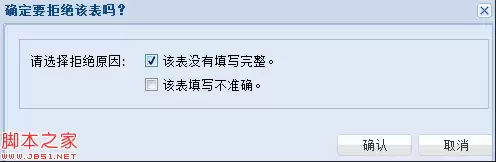
该弹出窗口的主要代码如下:
var win = new Ext.Window({
modal : true,
title : '确定要拒绝该表吗?',
width : 500,
plain : true,
items : [fp]
});
win.show();
弹出的窗口是载体,items里面的[fp]是form表单的句柄。
具体定义如下:
var fp = Ext.create('Ext.FormPanel', {
frame: true,
fieldDefaults: {
labelWidth: 110
},
width: 500,
bodyPadding: 10,
items: [
{
xtype: 'fieldset',
flex: 1,
//title: '确定要拒绝该张表吗?',
defaultType: 'checkbox',
layout: 'anchor',
defaults: {
anchor: '100%',
hideEmptyLabel: false
},
items:[{
fieldLabel: '请选择拒绝原因:',
boxLabel: '该表没有填写完整。',
name:'integrity',
inputValue: '1'
}, {
name:'correct',
boxLabel: '该表填写不准确。',
inputValue: '1'
}]
}],
buttons: [
{text: '确认',handler: function(){
//得到完整性和准确性信息 有则为1 没有为0
if(fp.getForm().isValid()){
console.log(fp.getForm().findField('integrity').getValue()?1:0);
console.log(fp.getForm().findField('correct').getValue()?1:0)
}
win.hide();
}
},{
text: '取消',
handler: function(){
win.hide();
}
}]
});
这里面基本涵盖了所有的感兴趣的信息。具体的参见API吧本身不难
着重说下得到checkBox的值
console.log(fp.getForm().findField('integrity').getValue()?1:0);
console.log(fp.getForm().findField('correct').getValue()?1:0)
这两句话就是如何得到完整性和正确性的值。
如图所示(请忽略UI的不好看):
该弹出窗口的主要代码如下:
复制代码 代码如下:
var win = new Ext.Window({
modal : true,
title : '确定要拒绝该表吗?',
width : 500,
plain : true,
items : [fp]
});
win.show();
弹出的窗口是载体,items里面的[fp]是form表单的句柄。
具体定义如下:
复制代码 代码如下:
var fp = Ext.create('Ext.FormPanel', {
frame: true,
fieldDefaults: {
labelWidth: 110
},
width: 500,
bodyPadding: 10,
items: [
{
xtype: 'fieldset',
flex: 1,
//title: '确定要拒绝该张表吗?',
defaultType: 'checkbox',
layout: 'anchor',
defaults: {
anchor: '100%',
hideEmptyLabel: false
},
items:[{
fieldLabel: '请选择拒绝原因:',
boxLabel: '该表没有填写完整。',
name:'integrity',
inputValue: '1'
}, {
name:'correct',
boxLabel: '该表填写不准确。',
inputValue: '1'
}]
}],
buttons: [
{text: '确认',handler: function(){
//得到完整性和准确性信息 有则为1 没有为0
if(fp.getForm().isValid()){
console.log(fp.getForm().findField('integrity').getValue()?1:0);
console.log(fp.getForm().findField('correct').getValue()?1:0)
}
win.hide();
}
},{
text: '取消',
handler: function(){
win.hide();
}
}]
});
这里面基本涵盖了所有的感兴趣的信息。具体的参见API吧本身不难
着重说下得到checkBox的值
复制代码 代码如下:
console.log(fp.getForm().findField('integrity').getValue()?1:0);
console.log(fp.getForm().findField('correct').getValue()?1:0)
这两句话就是如何得到完整性和正确性的值。
相关文章
- CanopyOps:AI Agent 工具实践指南 10-07
- newbie-dev-buddy:实践指南 10-07
- notabene:实践指南 10-07
- cwi-learn:AI Agent 工具实践指南 10-07
- NinFenz:AI Agent 工具实践指南 10-07
- SpaceAssistant:AI Agent 工具实践指南 10-07