




最新下载


热门教程
- 1
- 2
- 3
- 4
- 5
- 6
- 7
- 8
- 9
- 10
使用Feign做远程调用失败:Bean无法创建问题及解决
时间:2026-06-04 08:26:32 编辑:袖梨 来源:一聚教程网
在Spring Cloud框架中,使用Feign进行远程调用时,若遇到No bean found错误,通常由依赖版本不匹配引起。以下步骤可帮助排查解决。
报错
No bean found of type interface org.springframework.cloud.openfeign.Targeter for 服务名.
步骤
1.引入依赖
想要使用springcloud组件,一般在父工程pom文件里加入:
                org.springframework.cloud
                spring-cloud-dependencies
                ${springcloud.version}
                pom
                import
而后在要使用的子pom中引入openFeign依赖,最好不要添加版本,就是因为手欠,加了version,导致报错
            org.springframework.cloud
            spring-cloud-starter-openfeign
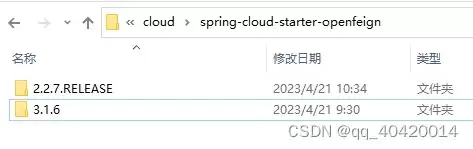
手动加入3.1.6版本,但是和springcloud版本不符合,然后删除version后,Maven自动帮我们下载了对应的版本2.2.7
2.添加注解
@SpringBootApplication
@EnableFeignClients(basePackages = "com.example.client")
3.写接口
@FeignClient("UserService")
public interface UserClient {
    @GetMapping("/user/{id}")
    User findById(@PathVariable("id") Long id);
}
细心哪!
总结
总结以上经验,通过查看依赖版本、添加注解和正确编写接口,能有效解决Feign远程调用中的Bean创建问题。
您可能感兴趣的文章:- SpringCloud OpenFeign远程调用传递请求头信息方式
- Spring Cloud实现远程调用OpenFeign组件的方法
- SpringCloud中的Feign远程调用最佳实践方案
- Spring Cloud之远程调用OpenFeign参数传递
- Spring Cloud使用Feign进行远程调用的操作指南
- OpenFeign无法远程调用问题及解决
- 解决OpenFeign远程调用返回的对象总是null问题