




最新下载


热门教程
- 1
- 2
- 3
- 4
- 5
- 6
- 7
- 8
- 9
- 10
Java操作Excel实战教程:Apache POI从入门到精通详解
时间:2026-05-31 11:00:02 编辑:袖梨 来源:一聚教程网
Java开发中处理Excel文件时,Apache POI和EasyExcel是最常用的解决方案。本文将详细介绍POI的核心使用方法,帮助开发者快速掌握Excel操作技巧。
一、Excel操作方式概述
在Java环境下处理Excel文件时,通常采用以下两种主流方案:
- Apache POI:由Apache基金会维护的开源项目,支持操作包括Excel在内的多种Office格式文档。
- EasyExcel:阿里巴巴推出的轻量级框架,基于POI进行封装,简化了Excel处理流程。
二、Java基础IO流操作Excel的局限性
虽然Java基础IO流可以实现文件传输功能,但直接用来读取Excel文件会导致数据解析异常。使用字符流读取会产生乱码或无法识别的字符序列。
// 错误示例:字符流读取Excel
import java.io.FileReader;
import java.io.BufferedReader;
import java.io.IOException;

public class WrongExcelReaderDemo {
    public static void main(String[] args) {
        String excelFilePath = "src/test/java/Demo.xlsx";
        FileReader fileReader = null;
        BufferedReader bufferedReader = null;

        try {
            fileReader = new FileReader(excelFilePath);
            bufferedReader = new BufferedReader(fileReader);

            System.out.println("尝试用字符流读取Excel文件内容:");
            String line;
            while ((line = bufferedReader.readLine()) != null) {
                System.out.println(line);
            }

        } catch (IOException e) {
            e.printStackTrace();
        } finally {
            try {
                if (bufferedReader != null) bufferedReader.close();
                if (fileReader != null) fileReader.close();
            } catch (IOException e) {
                e.printStackTrace();
            }
        }
    }
}
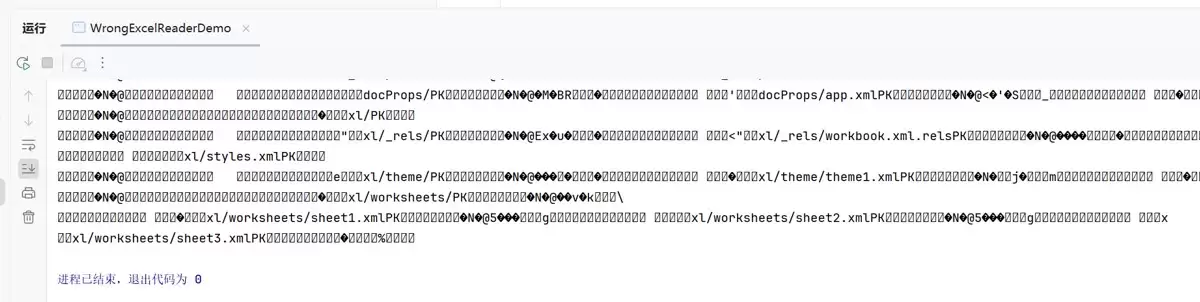
基础IO流仅适合二进制文件传输,无法直接解析Excel数据结构。
三、Apache POI入门
3.1 POI简介
Apache POI(Poor Obfuscation Implementation)是处理Microsoft Office文档的Java API,支持Excel、Word等多种格式。
3.2 Excel文件格式
Excel主要包含两种文件格式:
- .xls:旧版格式(2003及之前),最大支持65536行×256列
- .xlsx:新版格式(2007及之后),最大支持1048576行×16384列
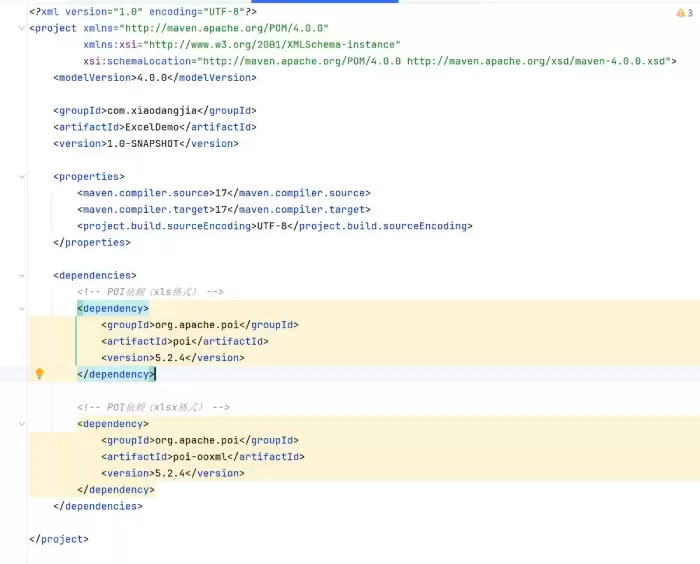
3.3 导入POI依赖
根据Excel版本选择对应依赖:
    org.apache.poi
    poi
    5.2.4


    org.apache.poi
    poi-ooxml
    5.2.4
四、POI写入Excel文件
以下通过实例演示如何使用POI创建Excel文件:
4.1 核心API说明
- Workbook:工作簿接口
HSSFWorkbook:处理.xls格式XSSFWorkbook:处理.xlsx格式
- Sheet:工作表对象
- Row:行对象
- Cell:单元格对象
4.2 写入Excel示例
import org.apache.poi.hssf.usermodel.HSSFWorkbook;
import org.apache.poi.ss.usermodel.*;
import java.io.FileOutputStream;
import java.io.IOException;

public class Test {
    public static void main(String[] args) throws Exception {
        Workbook workbook = new HSSFWorkbook();
        Sheet sheet = workbook.createSheet("实习记录");

        // 创建表头
        Row headerRow = sheet.createRow(0);
        headerRow.createCell(0).setCellValue("姓名");
        headerRow.createCell(1).setCellValue("性别");
        headerRow.createCell(2).setCellValue("工作");
        headerRow.createCell(3).setCellValue("公司");

        // 填充数据
        Row dataRow = sheet.createRow(1);
        dataRow.createCell(0).setCellValue("小当家");
        dataRow.createCell(1).setCellValue("男");
        dataRow.createCell(2).setCellValue("后端开发");
        dataRow.createCell(3).setCellValue("xxx");

        // 调整列宽
        for (int i = 0; i < 4; i++) {
            sheet.autoSizeColumn(i);
        }

        try (FileOutputStream fos = new FileOutputStream("D:实习记录.xls")) {
            workbook.write(fos);
            System.out.println("文件生成成功!路径:D:实习记录.xls");
        } catch (IOException e) {
            e.printStackTrace();
        } finally {
            workbook.close();
        }
    }
}
4.3 运行结果
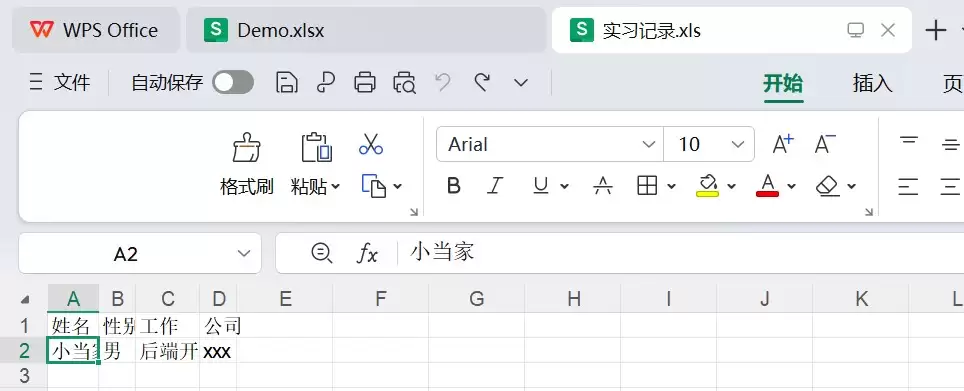
执行后将在D盘生成"实习记录.xls"文件:

日志报错不影响功能演示。
五、POI读取Excel文件
5.1 基本读取示例
import org.apache.poi.hssf.usermodel.HSSFWorkbook;
import org.apache.poi.ss.usermodel.*;
import java.io.FileInputStream;
import java.io.InputStream;

public class TestRead {
    public static void main(String[] args) throws Exception {
        InputStream inputStream = new FileInputStream("D:实习记录.xls");
        Workbook workbook = new HSSFWorkbook(inputStream);
        Sheet sheet = workbook.getSheetAt(0);

        Row dataRow = sheet.getRow(1);
        System.out.println("姓名:" + dataRow.getCell(0).getStringCellValue());
        System.out.println("性别:" + dataRow.getCell(1).getStringCellValue());
        System.out.println("工作:" + dataRow.getCell(2).getStringCellValue());
        System.out.println("公司:" + dataRow.getCell(3).getStringCellValue());

        inputStream.close();
    }
}
5.2 运行结果

5.3 处理不同类型的单元格
读取时需根据单元格类型选择对应方法:
import org.apache.poi.hssf.usermodel.HSSFWorkbook;
import org.apache.poi.ss.usermodel.*;
import java.io.FileInputStream;
import java.io.InputStream;

public class TestRead {
    public static void main(String[] args) throws Exception {
        InputStream inputStream = new FileInputStream("D:实习记录.xls");
        Workbook workbook = new HSSFWorkbook(inputStream);
        Sheet sheet = workbook.getSheetAt(0);
        Row dataRow = sheet.getRow(1);

        // 处理不同类型单元格
        Cell jobCell = dataRow.getCell(2);
        String job = jobCell.getCellType() == CellType.STRING ?
            jobCell.getStringCellValue() :
            String.valueOf(jobCell.getNumericCellValue());

        Cell companyCell = dataRow.getCell(3);
        String company = companyCell.getCellType() == CellType.STRING ?
            companyCell.getStringCellValue() :
            String.valueOf(companyCell.getNumericCellValue());

        System.out.println("工作:" + job);
        System.out.println("公司:" + company);

        inputStream.close();
    }
}
六、总结
本文系统讲解了Java操作Excel的核心技术:
- 比较了POI和EasyExcel的特性差异
- 分析了基础IO流的局限性
- 详细介绍了POI的核心API
- 演示了Excel文件的读写操作
- 讲解了混合数据类型的处理方法
掌握POI技术能够应对大多数Excel处理需求,对于大数据量场景可考虑使用EasyExcel等优化方案提升性能。
相关文章
- 片库网官网-免费在线观看高清入口 09-28
- 正则表达式量词与贪婪的使用详解 09-28
- 我的世界mc.js官网入口地址 mc.js网页版免费在线玩链接 09-28
- jm漫画-官方正版网页入口 09-28
- pixiv网页版官网地址-pixiv网页版最新入口 09-28
- Idea使用正则表达式批量替换字符串的方法 09-28