




最新下载


热门教程
- 1
- 2
- 3
- 4
- 5
- 6
- 7
- 8
- 9
- 10
vxe-select下拉框实现单选框与复选框勾选功能
时间:2026-05-29 10:45:01 编辑:袖梨 来源:一聚教程网
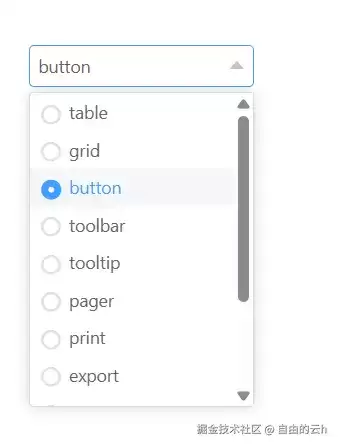
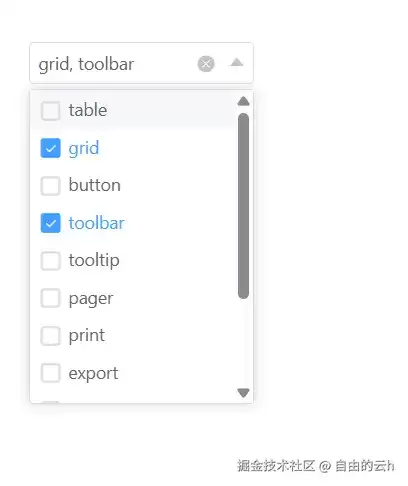
在实际开发中,为下拉选择组件添加单选框或复选框能显著提升用户操作体验。vxe-select通过show-radio和show-checkbox属性,可轻松实现这种带选项标记的选择功能。
单选框
设置show-radio属性即可为单选模式的下拉选项添加单选框标记,让选择状态更加直观明确。
<template>
  <div>
    <vxe-select v-model="val1" v-bind="selectOptions">vxe-select>
  div>
template><script setup>
import { ref, reactive } from 'vue'const val1 = ref()const selectOptions = reactive({
  clearable: true,
  showRadio: true,
  options: [
    { value: 1001, label: 'table' },
    { value: 1002, label: 'grid' },
    { value: 1003, label: 'button' },
    { value: 1004, label: 'toolbar' },
    { value: 1005, label: 'tooltip' },
    { value: 1006, label: 'pager' },
    { value: 1007, label: 'print' },
    { value: 1008, label: 'export' },
    { value: 1009, label: 'import' },
    { value: 1010, label: 'select' },
    { value: 1012, label: 'checkbox' },
    { value: 1013, label: 'group' }
  ]
})
script>
复选框
启用show-checkbox属性可为多选模式的下拉选项添加复选框,支持批量选择和取消选择操作。
<template>
  <div>
    <vxe-select v-model="val1" v-bind="selectOptions">vxe-select>
  div>
template><script setup>
import { ref, reactive } from 'vue'const val1 = ref([])const selectOptions = reactive({
  clearable: true,
  multiple: true,
  showCheckbox: true,
  options: [
    { value: 1001, label: 'table' },
    { value: 1002, label: 'grid' },
    { value: 1003, label: 'button' },
    { value: 1004, label: 'toolbar' },
    { value: 1005, label: 'tooltip' },
    { value: 1006, label: 'pager' },
    { value: 1007, label: 'print' },
    { value: 1008, label: 'export' },
    { value: 1009, label: 'import' },
    { value: 1010, label: 'select' },
    { value: 1012, label: 'checkbox' },
    { value: 1013, label: 'group' }
  ]
})
script>
说明
- show-radio属性仅适用于单选模式,show-checkbox仅适用于多选模式
- 当下拉选项较多时,建议配合filterable属性实现搜索功能以优化用户体验
通过合理配置vxe-select组件的相关属性,可以轻松实现带标记的下拉选择功能,有效提升用户界面操作的直观性和易用性。
相关文章
- CanopyOps:AI Agent 工具实践指南 10-07
- newbie-dev-buddy:实践指南 10-07
- notabene:实践指南 10-07
- cwi-learn:AI Agent 工具实践指南 10-07
- NinFenz:AI Agent 工具实践指南 10-07
- SpaceAssistant:AI Agent 工具实践指南 10-07