




最新下载


热门教程
- 1
- 2
- 3
- 4
- 5
- 6
- 7
- 8
- 9
- 10
uniapp-web灵活控制style-scoped样式作用域
时间:2026-05-28 19:40:01 编辑:袖梨 来源:一聚教程网
在使用uni-app开发时,可能会遇到页面样式被默认scoped限制的问题。本文将详细介绍如何解决这一常见困扰,让全局样式正常生效。
前言
郑重承诺以下内容不由 AI 生成
在uni-app vue3项目中,即使页面未添加scoped样式,仍会默认开启scoped效果,影响全局样式应用。通过深入研究,我们发现这是uni-app的默认设置,下面分享具体解决方案。
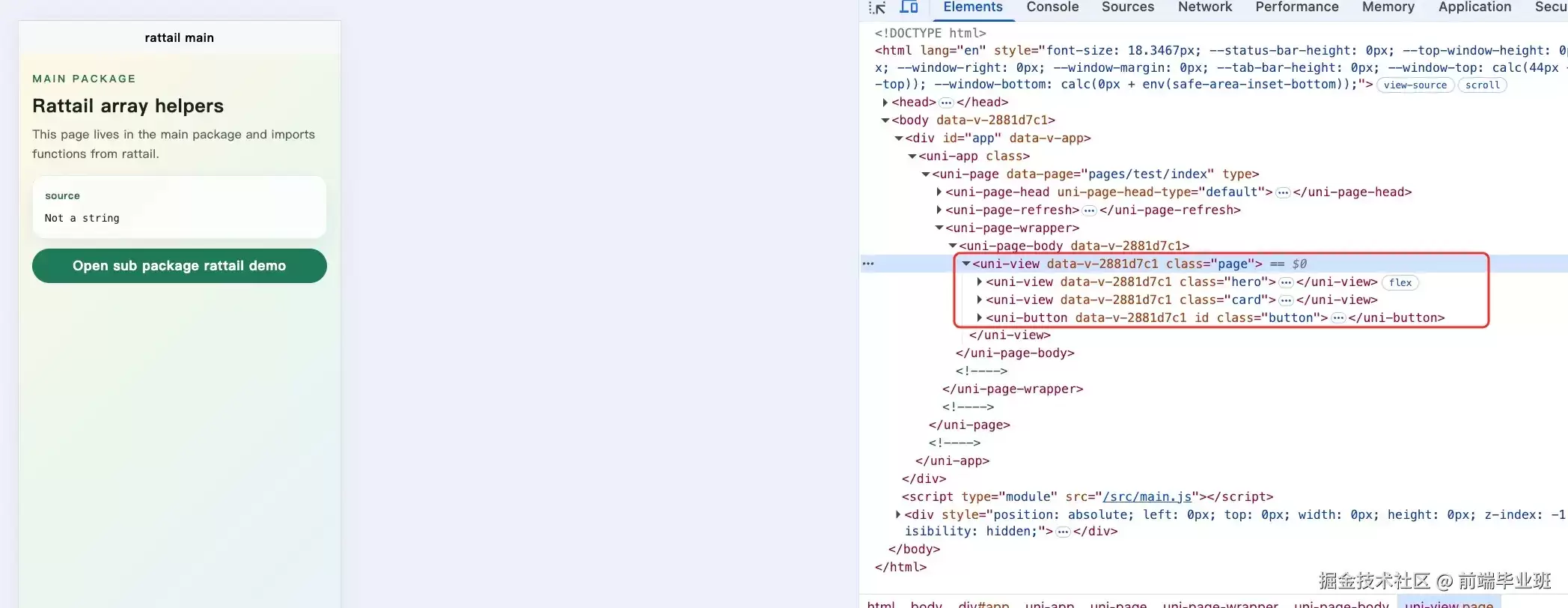
测试代码
<template>
  <view class="page">
    <view class="hero">
      <text class="eyebrow">Main packagetext>
      <text class="title">Rattail array helperstext>
      <text class="desc">
        This page lives in the main package and imports functions from rattail.
      text>
    view>    <view class="card">
      <text class="label">sourcetext>
      <text class="code">{{ sourceText }}text>
    view>    <button class="button" @click="goSubPackage">
      Open sub package rattail demo
    button>
  view>
template><script setup>
import { computed } from 'vue'
import { isString } from 'rattail'const numbers = [1, 2, 2, 3, 4, 4, 5, 6]const sourceText = computed(() => isString(numbers) ? 'A string' : 'Not a string')function goSubPackage() {
  uni.navigateTo({
    url: '/pages/sub/rattail/index',
  })
}
script>// 这里并没有添加 scoped
<style>
.page {
  min-height: 100vh;
  padding: 40rpx 32rpx;
  background: linear-gradient(135deg, #fff7e6 0%, #e9f7ef 48%, #e8f1ff 100%);
  box-sizing: border-box;
}.hero {
  display: flex;
  flex-direction: column;
  gap: 14rpx;
  margin-bottom: 28rpx;
}.eyebrow {
  color: #2f6f55;
  font-size: 24rpx;
  font-weight: 700;
  letter-spacing: 4rpx;
  text-transform: uppercase;
}.title {
  color: #16231e;
  font-size: 44rpx;
  font-weight: 800;
}.desc {
  color: #52615b;
  font-size: 28rpx;
  line-height: 1.6;
}.card {
  padding: 28rpx;
  margin-bottom: 22rpx;
  border: 2rpx solid rgba(22, 35, 30, 0.08);
  border-radius: 28rpx;
  background: rgba(255, 255, 255, 0.75);
  box-shadow: 0 18rpx 40rpx rgba(47, 111, 85, 0.1);
}.label {
  display: block;
  margin-bottom: 14rpx;
  color: #2f6f55;
  font-size: 24rpx;
  font-weight: 700;
}.code {
  color: #16231e;
  font-family: Menlo, Consolas, monospace;
  font-size: 24rpx;
  line-height: 1.6;
  white-space: pre-wrap;
}.button {
  margin-top: 18rpx;
  color: #ffffff;
  background: #1f7a5a;
  border-radius: 999rpx;
  font-weight: 700;
}
style>
解决方案
对于cli项目,需要修改node_modules/@dcloudio/uni-h5-vite/dist/index.js文件,找到并注释掉uniCssScopedPlugin相关代码。
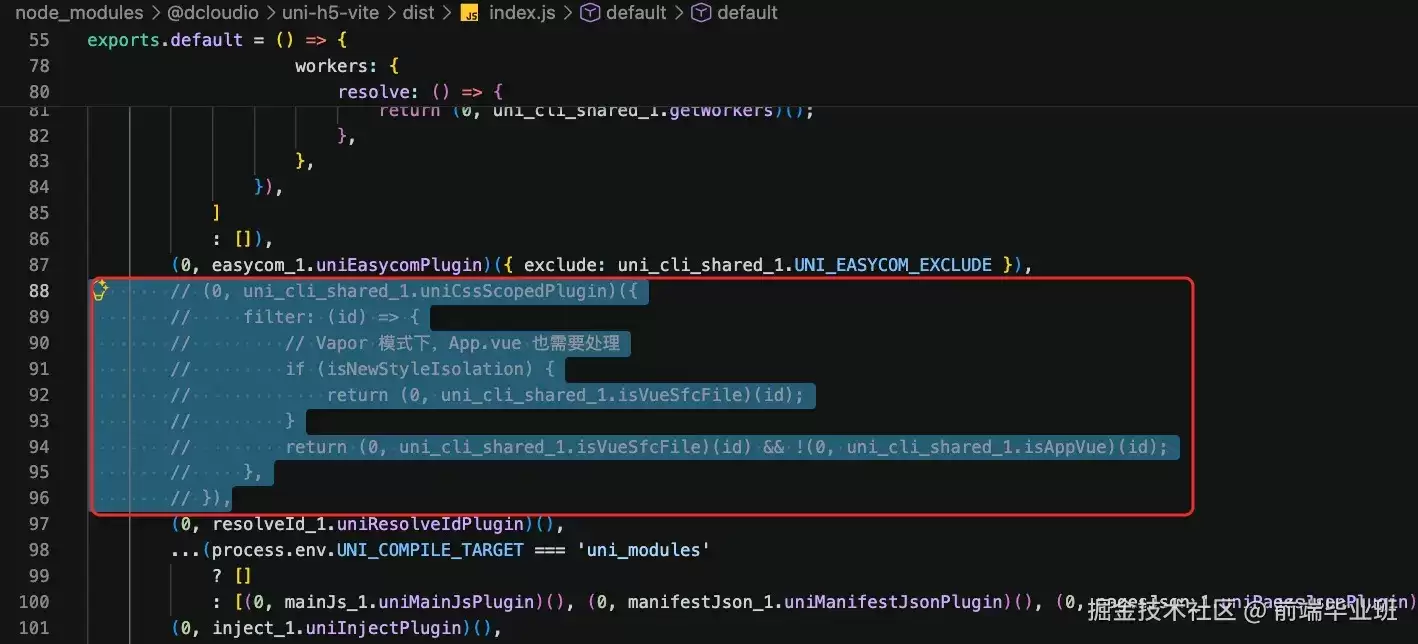
使用hbuilderx开发时,则需要定位到/Applications/HBuilderX.app/Contents/HBuilderX/plugins/uniapp-cli-vite/node_modules/@dcloudio/uni-h5-vite/dist/index.js文件进行相同修改。
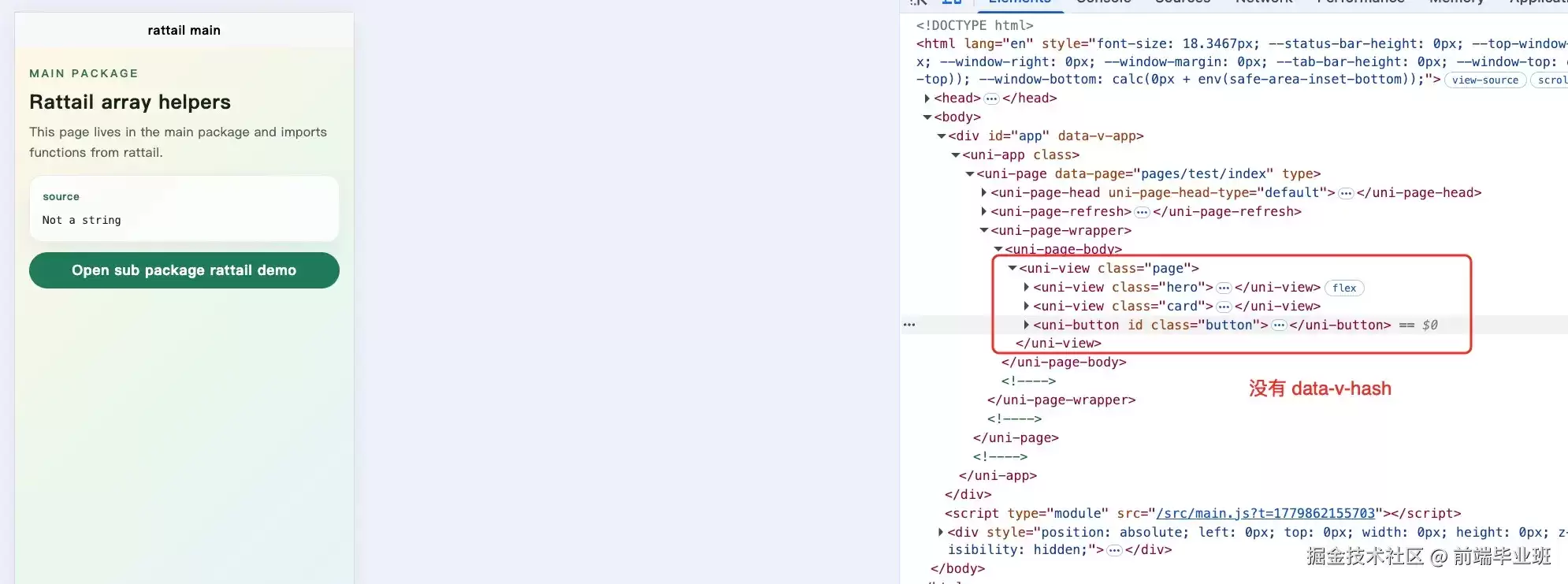
运行效果
写在最后
本文详细介绍了解决uni-app默认scoped样式问题的方法,希望能帮助开发者更好地控制样式作用域,提升开发效率。
相关文章
- CanopyOps:AI Agent 工具实践指南 10-07
- newbie-dev-buddy:实践指南 10-07
- notabene:实践指南 10-07
- cwi-learn:AI Agent 工具实践指南 10-07
- NinFenz:AI Agent 工具实践指南 10-07
- SpaceAssistant:AI Agent 工具实践指南 10-07