




最新下载


热门教程
- 1
- 2
- 3
- 4
- 5
- 6
- 7
- 8
- 9
- 10
逃离鸭科夫鸭古兽怎么捏脸 鸭古兽捏脸数据代码分享
时间:2025-12-08 19:25:02 编辑:袖梨 来源:一聚教程网
逃离鸭科夫鸭古兽捏脸数据代码在捏脸界面左下角有个应用剪贴板中的数据,直接点击方可导入数据,接下来将为大家带来逃离鸭科夫鸭古兽捏脸数据代码分享!

捏脸数据代码大全>>>点击前往
逃离鸭科夫鸭古兽捏脸数据代码分享
一、效果图



二、代码
{"savedSetting":false,"headSetting":{"mainColor":{"r":0.992,"g":0.847,"b":0.208,"a":1},"headScaleOffset":0.3,"foreheadHeight":0,"foreheadRound":1},"hairID":9,"hairInfo":{"radius":0,"color":{"r":0.992,"g":0.847,"b":0.208,"a":1},"height":0,"heightOffset":0,"scale":1,"twist":0,"distanceAngle":0,"leftRightAngle":0},"eyeID":2,"eyeInfo":{"radius":0.23,"color":{"r":0.145,"g":0.608,"b":0.141,"a":1},"height":0.246,"heightOffset":0,"scale":2.015,"twist":-5.718,"distanceAngle":67.224,"leftRightAngle":0},"eyebrowID":1,"eyebrowInfo":{"radius":0.23,"color":{"r":0.992,"g":0.847,"b":0.208,"a":1},"height":0.074,"heightOffset":0.246,"scale":2.696,"twist":-8.024,"distanceAngle":76.45,"leftRightAngle":0},"mouthID":30,"mouthInfo":{"radius":0.23,"color":{"r":0.992,"g":0.847,"b":0.208,"a":1},"height":0.111,"heightOffset":0,"scale":0.8,"twist":0,"distanceAngle":0,"leftRightAngle":0},"tailID":1,"tailInfo":{"radius":0,"color":{"r":1,"g":0.735,"b":0.231,"a":1},"height":0,"heightOffset":0,"scale":2,"twist":0,"distanceAngle":0,"leftRightAngle":0},"footID":0,"footInfo":{"radius":0,"color":{"r":1,"g":0.403,"b":0.203,"a":1},"height":0,"heightOffset":0,"scale":1.5,"twist":0,"distanceAngle":0,"leftRightAngle":0},"wingID":1,"wingInfo":{"radius":0,"color":{"r":1,"g":0.735,"b":0.231,"a":1},"height":0,"heightOffset":0,"scale":2,"twist":0,"distanceAngle":0,"leftRightAngle":0}}
三、使用方法
玩家在开局捏脸界面左下角有个应用剪贴板中的数据,直接点击方可导入数据。
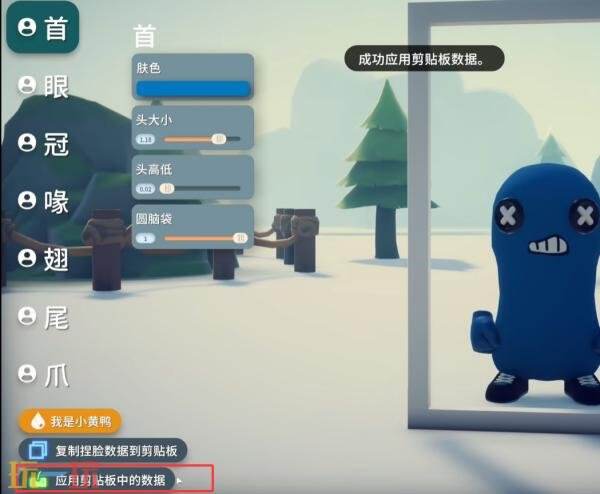
应用成功会直接显示成功应用剪贴板数据。此时就会发现鸭鸭捏脸是之前自己保存代码的捏脸了。
以上就是关于逃离鸭科夫鸭古兽捏脸数据代码分享的全部内容,希望能够有所帮助。更多相关内容前往一聚下载查看。
相关文章
- 数据加密DES是一种什么算法要注意什么-核心信息和使用场景 08-30
- HarmonyOS 6(API 23)实战-PC端AI智能体沉浸 08-30
- WorkBuddy处理Excel好用吗-五个Excel场景 08-30
- Excel折线图如何添加数据标签和趋势线 08-30
- excel编号列隐藏了如何办 08-30
- 为什么使用对称算法加密数据怎么操作-步骤和注意点 08-30