




最新下载


热门教程
- 1
- 2
- 3
- 4
- 5
- 6
- 7
- 8
- 9
- 10
jsp实现用户自动登录功能
时间:2025-07-05 18:55:01 编辑:袖梨 来源:一聚教程网
这篇文章主要为大家详细介绍了jsp实现用户自动登录功能,文中示例代码介绍的非常详细,具有一定的参考价值,感兴趣的小伙伴们可以参考一下
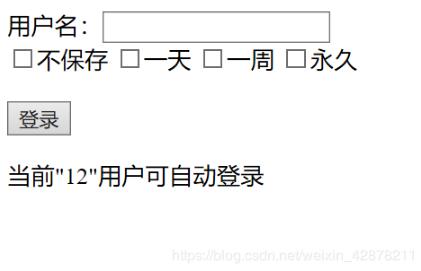
理解并掌握Cookie的作用以及利用cookie实现用户的自动登录功能,实现下图效果
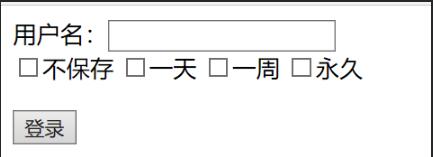
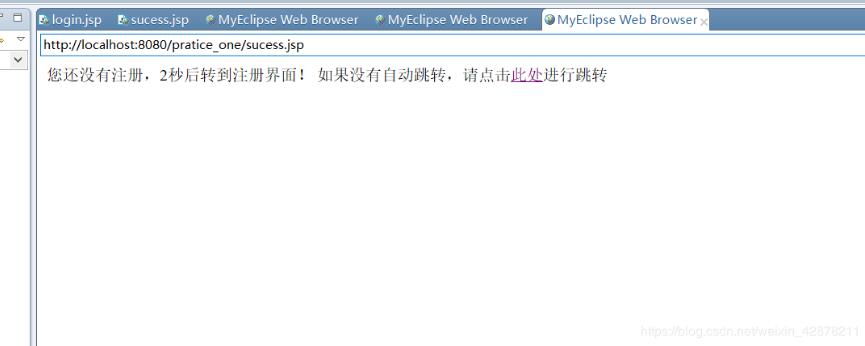
当服务器判断出该用户是首次登录的时候,会自动跳转到登录界面等待用户登录,并填入相关信息。通过设置Cookie的有效期限来保存用户的信息,关闭浏览器后,验证是否能够自动登录,若能登录,则打印欢迎信息;否则跳转到登录页面。
login.jsp
<%@ page language="java" import="java.util.*" pageEncoding="utf-8"%><%String path = request.getContextPath();String basePath = request.getScheme()+"://"+request.getServerName()+":"+request.getServerPort()+path+"/";%><%request.setCharacterEncoding("GB2312"); %><!DOCTYPE HTML PUBLIC "-//W3C//DTD HTML 4.01 Transitional//EN"><html> <head> <base href="<%=basePath%>" rel="external nofollow" rel="external nofollow" ><title>My JSP 'login.jsp' starting page</title><meta http-equiv="pragma" content="no-cache"> <meta http-equiv="cache-control" content="no-cache"> <meta http-equiv="expires" content="0"><meta http-equiv="keywords" content="keyword1,keyword2,keyword3"> <meta http-equiv="description" content="This is my page"> <!-- <link rel="stylesheet" type="text/css" href="styles.css" rel="external nofollow" rel="external nofollow" > --> <script type="text/javascript"> window.onload = function(){//获取submitvar submit = document.getElementById("submit");var name = document.getElementById("name");//为submit绑定单击响应函数submit.onclick = function(){times = document.getElementsByName("time");var count=0;for(var i=0;i<times.length;i++){ if(times[i].checked == true){ count++; }}if(count>=2){ alert("只能选择一个选项"); return false;}};};</script> </head><body> <!-- 设置html页面 --> <form action="sucess.jsp" method="post"> 用户名:<input name="username" /><br/><input type="checkbox" name="time" value="notSave" />不保存<input type="checkbox" name="time" value="aDay" />一天<input type="checkbox" name="time" value="aWeek" />一周<input type="checkbox" name="time" value="forever" />永久<br/><br/><input type="submit" name="submit" id="submit" value="登录"/> </form> <%//读取session值 String val= (String)session.getAttribute("name"); //如果session不存在 if(val==null){val ="不存在"; } out.print("当前""+val+""用户可自动登录"); %> </body></html>
sucess.jsp
%@ page language="java" import="java.util.*" pageEncoding="UTF-8"%><%String path = request.getContextPath();String basePath = request.getScheme()+"://"+request.getServerName()+":"+request.getServerPort()+path+"/";%><!DOCTYPE HTML PUBLIC "-//W3C//DTD HTML 4.01 Transitional//EN"><html> <head> <base href="<%=basePath%>" rel="external nofollow" rel="external nofollow" ><title>My JSP 'show.jsp' starting page</title><meta http-equiv="pragma" content="no-cache"> <meta http-equiv="cache-control" content="no-cache"> <meta http-equiv="expires" content="0"><meta http-equiv="keywords" content="keyword1,keyword2,keyword3"> <meta http-equiv="description" content="This is my page"> <!-- <link rel="stylesheet" type="text/css" href="styles.css" rel="external nofollow" rel="external nofollow" > --> </head><body> <% //获取username String name = request.getParameter("username"); //判断用户名是否存在 if(name != null && !name.trim().equals("")){String[] time = request.getParameterValues("time"); //设置session值,便于login页面读取 session.setAttribute("name", name); //设置Cookie Cookie Cookie = new Cookie("name",name); //根据提交选项设置cookie保存时间 if(time != null){for(int i=0;i<time.length;i++){//不保存Cookieif(time[i].equals("notSave")){ Cookie.setMaxAge(0); }//保存一天Cookieif(time[i].equals("aDay")){ Cookie.setMaxAge(60*60*24);}//保存一周Cookieif(time[i].equals("aWeek")){ Cookie.setMaxAge(60*60*24*7);}//永久保存Cookie,设置为100年if(time[i].equals("forever")){ Cookie.setMaxAge(60*60*24*365*100);}} }//在客户端保存Cookie response.addCookie(Cookie); }else{%><%--用户名不存在则进行判断是否已有cookie --%> <% //获取cookie Cookie[] cookies = request.getCookies();//cookie存在 if(cookies != null && cookies.length > 0){for(Cookie cookie:cookies){//获取cookie的名字String cookieName = cookie.getName();//判断是否与name相等if(cookieName.equals("name")){ //获取cookie的值 String value = cookie.getValue(); name = value; }}} } if(name != null && !name.trim().equals("")){ out.print("您好: " + name+"欢迎登录"); } else{//否则重定向到登录界面out.print("您还没有注册,2秒后转到注册界面!"); response.setHeader("refresh","2;url=login.jsp"); %> 如果没有自动跳转,请点击<a href="login.jsp" rel="external nofollow" >此处</a>进行跳转 <% //response.sendRedirect("login.jsp"); }%></body></html>
实现效果:
1.
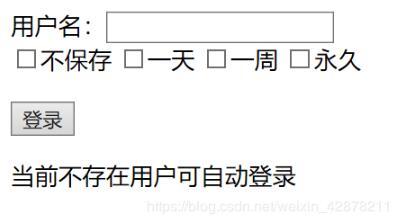
2.
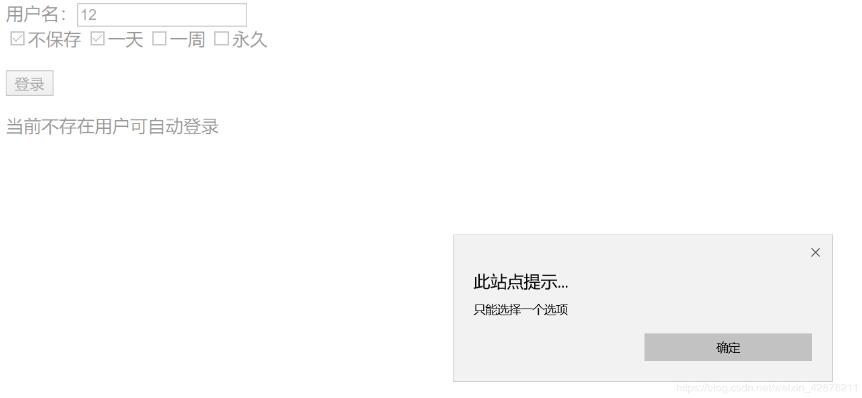
3.
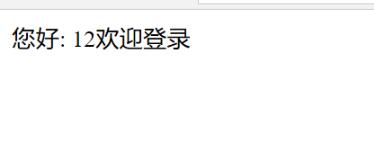
4.
5.
相关文章
- moses:实践指南 09-10
- lalboard:实践指南 09-10
- langchain-rag-tutorial:实践指南 09-10
- 植物大战僵尸3最后一关打法有哪些重点-关键信息和实际影响 09-10
- clonezilla:实践指南 09-10
- DUNE:实践指南 09-10