




最新下载


热门教程
- 1
- 2
- 3
- 4
- 5
- 6
- 7
- 8
- 9
- 10
使用displaynone时隐藏DOM元素无法获取实际宽高的解决方法
时间:2026-09-15 14:20:01 编辑:袖梨 来源:一聚教程网
案例说明
当DOM元素被添加上display:none;的样式时,这个元素和它的子元素无法获取到实际的宽高。如图,我设置了一个父元素和一个子元素,并且通过一个按钮切换父元素是否带有display:none;。
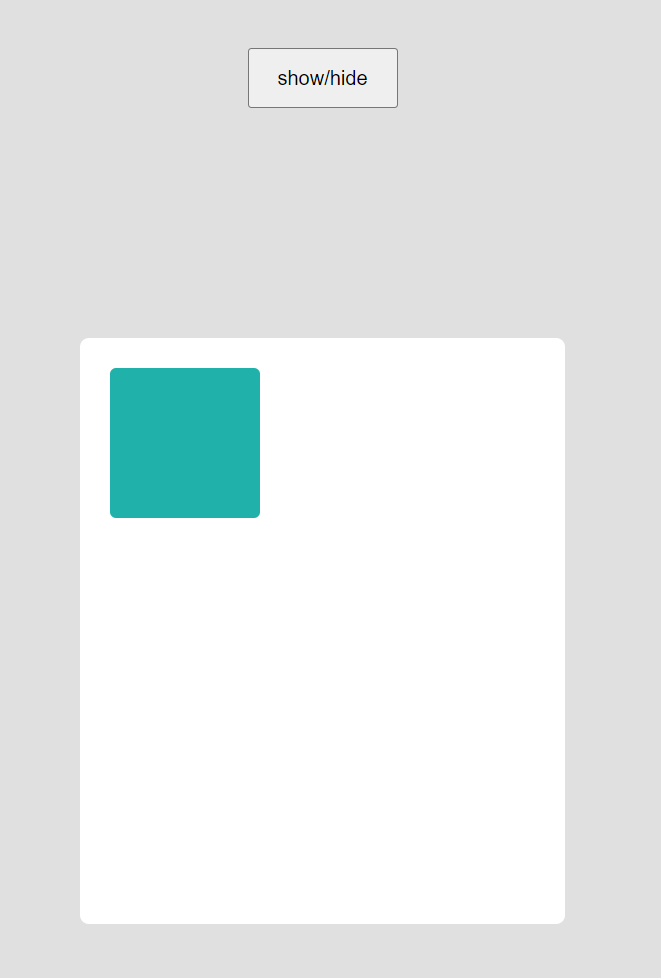

然后每次点击按钮后,在控制台输出两个元素的高度。
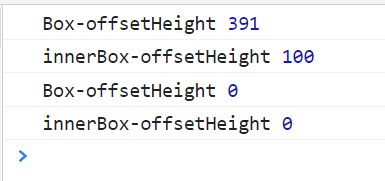
可以看到,当元素正常显示时,获取宽高正常。而当元素添加上`display:none;`之后,获取到的值变为0.
解决方法
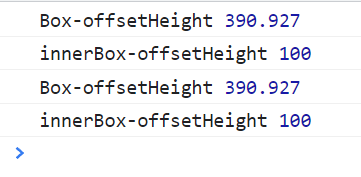
使用jquery的actual方法可以很方便的获取到元素的真实宽高。<script src="https://cdnjs.c*lo**udflare.com/ajax/libs/jquery.actual/1.0.19/jquery.actual.min.js"></script>语法格式//获取带有.hidden类的元素的实际高度$('.hidden').actual('height');使用actual方法后获取宽高正常,无论元素有没有被设置display:none;。(下图中两次输出,一次是带有display:none;的,一次是没有的,均能获取到实际高度)
原理:设置display:none;的元素没有物理尺寸,而同样能提供隐形效果的visibility则有物理尺寸,但是不能直接用visibility:hidden;代替display:none;,因为设置visibility之后的元素还是会占用页面空间的。正确的解决方法是要获取宽度或者高度时,首先将display:none;更换成display:block;,然后设置visibility让其隐形,从而获取实际宽高。
这里需要注意的是,当元素设置为块级元素时,可能会因为其大小使得周围的元素被推动,因此我们在获取某个元素的实际宽高时,除了设置display和visibility,还要设置position:absolute;,在获取到宽高值之后取消掉。
这个实现方法其实就是jquery的actual方法的内容:
源地址jquery.actual:Get the actual width/height of invisible DOM elements with jQuery.
如果打不开github也可以看下面的代码(jquery.actual.js的代码内容)
/*! Copyright 2012, Ben Lin (http://d**reamersl*ab.com/) * Licensed under the MIT License (LICENSE.txt). * * Version: 1.0.19 * * Requires: jQuery >= 1.2.3 */;( function ( factory ) {if ( typeof define === 'function' && define.amd ) {// AMD. Register module depending on jQuery using requirejs define.define( ['jquery'], factory );} else {// No AMD.factory( jQuery );}}( function ( $ ){$.fn.addBack = $.fn.addBack || $.fn.andSelf;$.fn.extend({actual : function ( method, options ){// check if the jQuery method existif( !this[ method ]){throw '$.actual => The jQuery method "' + method + '" you called does not exist';}var defaults = {absolute: false,clone : false,includeMargin : false,display : 'block'};var configs = $.extend( defaults, options );var $target = this.eq( 0 );var fix, restore;if( configs.clone === true ){fix = function (){var style = 'position: absolute !important; top: -1000 !important; ';// this is useful with css3pie$target = $target.clone().attr( 'style', style ).appendTo( 'body' );};restore = function (){// remove DOM element after getting the width$target.remove();};}else{var tmp = [];var style = '';var $hidden;fix = function (){// get all hidden parents$hidden = $target.parents().addBack().filter( ':hidden' );style += 'visibility: hidden !important; display: ' + configs.display + ' !important; ';if( configs.absolute === true ) style += 'position: absolute !important; ';// save the origin style props// set the hidden el css to be got the actual value later$hidden.each( function (){// Save original style. If no style was set, attr() returns undefinedvar $this = $( this );var thisStyle = $this.attr( 'style' );tmp.push( thisStyle );// Retain as much of the original style as possible, if there is one$this.attr( 'style', thisStyle ? thisStyle + ';' + style : style );});};restore = function (){// restore origin style values$hidden.each( function ( i ){var $this = $( this );var _tmp= tmp[ i ];if( _tmp === undefined ){$this.removeAttr( 'style' );}else{$this.attr( 'style', _tmp );}});};}fix();// get the actual value with user specific methed// it can be 'width', 'height', 'outerWidth', 'innerWidth'... etc// configs.includeMargin only works for 'outerWidth' and 'outerHeight'var actual = /(outer)/.test( method ) ?$target[ method ]( configs.includeMargin ) :$target[ method ]();restore();// IMPORTANT, this plugin only return the value of the first elementreturn actual;}});}));
actual方法的参数
Example Code:(来源于jquery.actual github项目说明)// get hidden element actual width$( '.hidden' ).actual( 'width' );// get hidden element actual innerWidth$( '.hidden' ).actual( 'innerWidth' );// get hidden element actual outerWidth$( '.hidden' ).actual( 'outerWidth' );// get hidden element actual outerWidth and set the `includeMargin` argument$( '.hidden' ).actual( 'outerWidth', { includeMargin : true });// get hidden element actual height$( '.hidden' ).actual( 'height' );// get hidden element actual innerHeight$( '.hidden' ).actual( 'innerHeight' );// get hidden element actual outerHeight$( '.hidden' ).actual( 'outerHeight' );// get hidden element actual outerHeight and set the `includeMargin` argument$( '.hidden' ).actual( 'outerHeight', { includeMargin : true });// if the page jumps or blinks, pass a attribute '{ absolute : true }'// be very careful, you might get a wrong result depends on how you makrup your html and css$( '.hidden' ).actual( 'height', { absolute : true });// if you use css3pie with a float element// for example a rounded corner navigation menu you can also try to pass a attribute '{ clone : true }'// please see demo/css3pie in action$( '.hidden' ).actual( 'width', { clone : true });// if it is not a block element. By default { display: 'block' }.// for example a inline element$( '.hidden' ).actual( 'width', { display: 'inline-block' });
到此这篇关于使用display:none时隐藏DOM元素无法获取实际宽高的解决方法的文章就介绍到这了,更多相关隐藏DOM元素无法获取实际宽高的解决方法内容请搜索一聚教程网以前的文章或继续浏览下面的相关文章希望大家以后多多支持一聚教程网!