




最新下载


热门教程
- 1
- 2
- 3
- 4
- 5
- 6
- 7
- 8
- 9
- 10
.NET使用YARP通过编码方式配置域名转发实现反向代理
时间:2023-08-04 14:42:06 编辑:袖梨 来源:一聚教程网
这篇文章介绍了.NET使用YARP通过编码方式配置域名转发实现反向代理的方法,文中通过示例代码介绍的非常详细。对大家的学习或工作具有一定的参考借鉴价值,需要的朋友可以参考下
前面介绍了 YARP 通过配置文件的方式配置代理转发(传送门),而众所周知,微软的一贯作风就是能通过配置文件做的事情,通过编码的方式也能实现!YARP 也不例外,废话不多说,直接上代码!
首先,参照官方文档,我们先新建一个InMemoryConfigProvider类,并且继承IProxyConfigProvider接口,类里面还包含了一个IProxyConfig的类,别看漏了噢!
这里多嘴一下,下面的代码出现了volatile关键字,介绍一下它:volatile是 C# 中用于控制同步的关键字,其意义是针对程序中一些敏感数据,不允许多线程同时访问,保证数据在任何访问时刻,最多有一个线程访问,以保证数据的完整性,volatile是修饰变量的修饰符。
public class InMemoryConfigProvider : IProxyConfigProvider{private volatile InMemoryConfig _config;public InMemoryConfigProvider(IReadOnlyList<RouteConfig> routes, IReadOnlyList<ClusterConfig> clusters){_config = new InMemoryConfig(routes, clusters);}public IProxyConfig GetConfig() => _config;public void Update(IReadOnlyList<RouteConfig> routes, IReadOnlyList<ClusterConfig> clusters){var oldConfig = _config;_config = new InMemoryConfig(routes, clusters);oldConfig.SignalChange();}private class InMemoryConfig : IProxyConfig{private readonly CancellationTokenSource _cts = new();public InMemoryConfig(IReadOnlyList<RouteConfig> routes, IReadOnlyList<ClusterConfig> clusters){Routes = routes;Clusters = clusters;ChangeToken = new CancellationChangeToken(_cts.Token);}public IReadOnlyList<RouteConfig> Routes { get; }public IReadOnlyList<ClusterConfig> Clusters { get; }public IChangeToken ChangeToken { get; }internal void SignalChange(){_cts.Cancel();}}}
然后添加一个扩展InMemoryConfigProviderExtensions
public static class InMemoryConfigProviderExtensions{public static IReverseProxyBuilder LoadFromMemory(this IReverseProxyBuilder builder, IReadOnlyList<RouteConfig> routes, IReadOnlyList<ClusterConfig> clusters){builder.Services.AddSingleton<IProxyConfigProvider>(new InMemoryConfigProvider(routes, clusters));return builder;}}
接下来就是写配置了,我个人还是喜欢在配置文件中写,但是有动态配置需求的话,又不想登录服务器编辑 appsetting 文件,通过编码的方式确实更为方便,将配置写进库或者其它存储方式里面,那将是随心所欲啊!上代码:
Program.cs
var routes = new[]{new RouteConfig(){RouteId = "admin",ClusterId = "admin",Match = new RouteMatch{Hosts = new string[] {"test1.ysmc.net.cn" },Path = "{**catch-all}"}},new RouteConfig(){RouteId = "blazor",ClusterId = "blazor",Match = new RouteMatch{Hosts = new string[] {"test2.ysmc.net.cn" },Path = "{**catch-all}"}}};var clusters = new[]{new ClusterConfig(){ClusterId = "admin",LoadBalancingPolicy = "RoundRobin",Destinations = new Dictionary<string, DestinationConfig>(StringComparer.OrdinalIgnoreCase){{ "admin", new DestinationConfig() { Address = "https://admin.bl**a*zor.zone" } }}},new ClusterConfig(){ClusterId = "blazor",LoadBalancingPolicy = "RoundRobin",Destinations = new Dictionary<string, DestinationConfig>(StringComparer.OrdinalIgnoreCase){{ "blazor", new DestinationConfig() { Address = "https://www.*b*lazo*r.zone" } }}}};builder.Services.AddReverseProxy().LoadFromMemory(routes, clusters);
上面的配置代码,跟配置文件方式的节点和属性,都是对应的,照着写就是了
"ReverseProxy": {"Routes": {"admin": {"ClusterId": "admin","Match": {"Hosts": [ "test1.ysmc.net.cn" ],"Path": "{**catch-all}"}},"blazor": {"ClusterId": "blazor","Match": {"Hosts": [ "test2.ysmc.net.cn" ],"Path": "{**catch-all}"}}},"Clusters": {"admin": {"LoadBalancingPolicy": "RoundRobin","Destinations": {"admin": {"Address": "https://admin.bl**a*zor.zone/"}}},"blazor": {"LoadBalancingPolicy": "RoundRobin","Destinations": {"blazor": {"Address": "https://www.*b*lazo*r.zone/"}}}}}
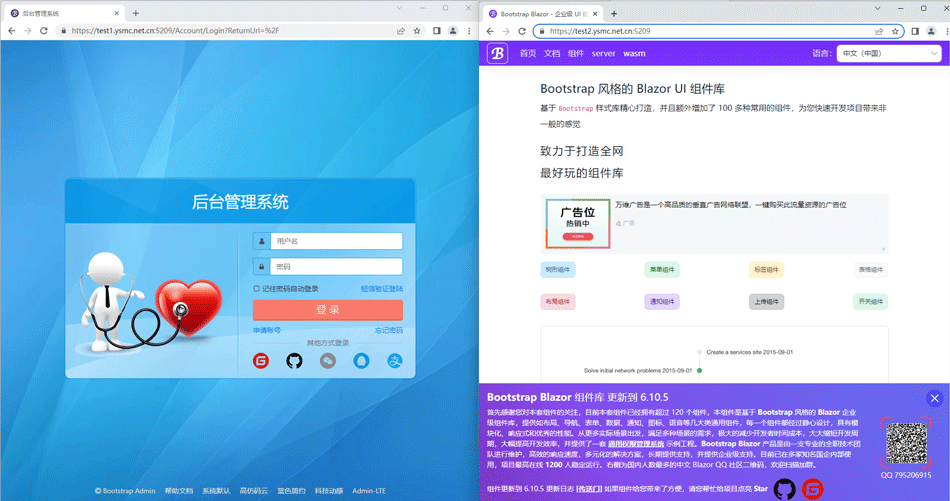
最终效果还是依旧的完美,感谢大佬的观看,谢谢!
相关文章
- jm在线网页版-jm漫画官网入口 09-29
- 永乐视频官网最新入口-永乐视频网页版快捷登录 09-29
- freeok-追剧也很卷官网地址-freeok在线追剧官方入口 09-29
- MC在线玩网页版网址是什么-mc我的世界在线玩网页版免费免登陆入口 09-29
- 禁漫天堂JM最新地址发布页:永久有效入口与防迷路指南 09-29
- iwara网页版入口-Iwara网页版最新访问地址 09-29