




最新下载


热门教程
- 1
- 2
- 3
- 4
- 5
- 6
- 7
- 8
- 9
- 10
使用.NETMAUI开发ChatGPT客户端的流程
时间:2026-09-16 14:00:02 编辑:袖梨 来源:一聚教程网
开发实战
我是设想开发一个类似 jetbrains 的 ToolBox 应用一样,启动程序在桌面右下角出现托盘图标,点击图标弹出应用(风格在 windows mac 平台保持一致)
需要实现的功能一览
托盘图标(右键点击有 menu)webview(js 和 csharp 互相调用)聊天 SPA 页面(react 开发,build 后让 webview 展示)新建一个 maui 工程(vs2022)
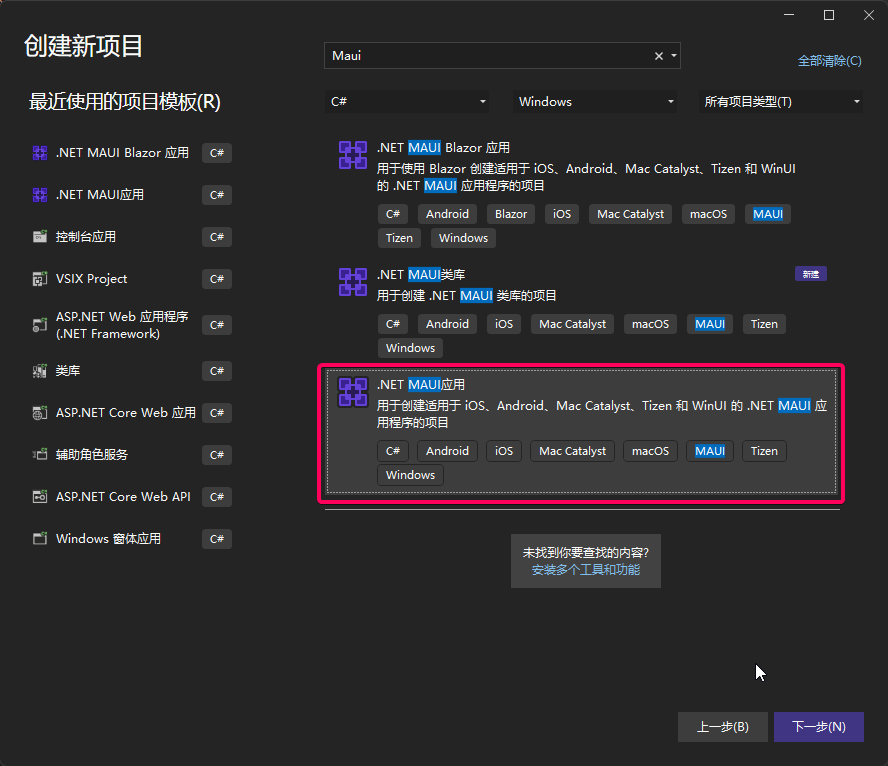
坑一:默认编译出来的 exe 是直接双击打不开的
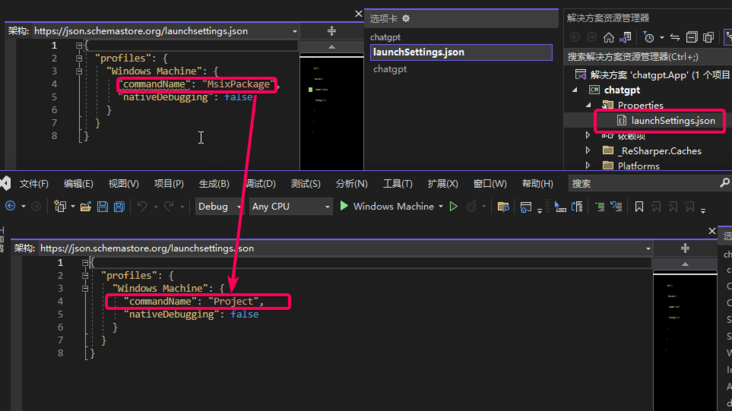
工程文件加上这个配置
<WindowsPackageType>None</WindowsPackageType><WindowsAppSDKSelfContained Condition="'$(IsUnpackaged)' == 'true'">true</WindowsAppSDKSelfContained><SelfContained Condition="'$(IsUnpackaged)' == 'true'">true</SelfContained>
以上修改后,编译出来的 exe 双击就可以打开了
托盘图标(右键点击有 menu)
启动时设置窗口不能改变大小,隐藏 titlebar, 让 Webview 控件占满整个窗口
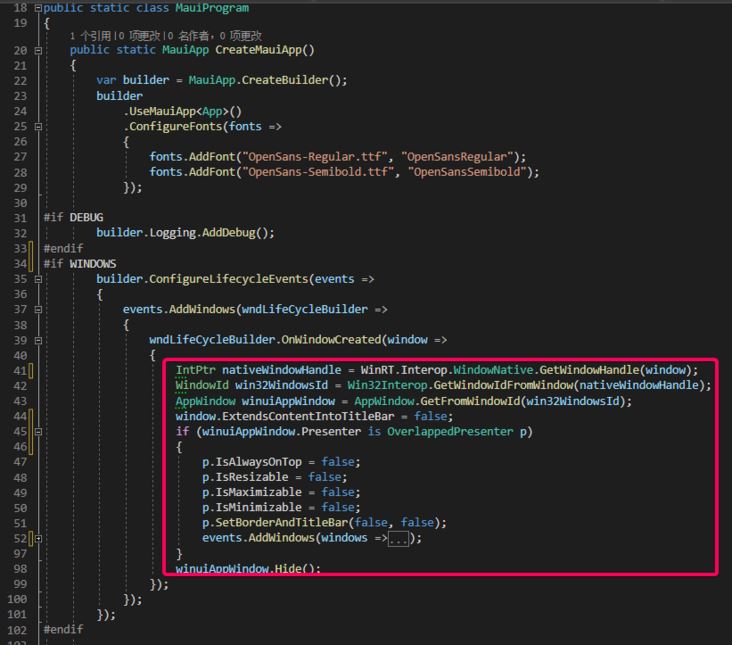
这里要根据平台不同实现不同了,windows 平台采用 winAPI 调用,具体看工程代码吧!
WebView
在 MainPage.xaml 添加控件
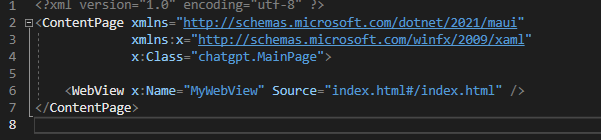
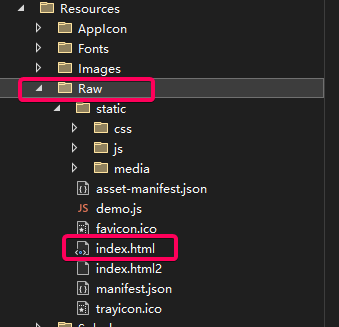
对应的静态 html 等文件放在工程的 ResourceRaw 文件夹下 (整个文件夹里面默认是作为内嵌资源打包的,工程文件里面的如下配置起的作用)
<!-- Raw Assets (also remove the "ResourcesRaw" prefix) --><MauiAsset Include="ResourcesRaw**" LogicalName="%(RecursiveDir)%(Filename)%(Extension)" />
【重点】js 和 csharp 互相调用
这部分我找了很多资料,最终参考了这个demo,然后改进了下。
主要原理是:
js 调用 csharp 方法前先把数据存储在 localstorage 里然后 windows.location 切换特定的 url 发起调用,返回一个 promise,等待 csharp 的事件csharp 端 webview 的 Navigating 事件,异步进行下面处理根据 url 解析出来 localstorage 的 key然后 csharp 端调用 excutescript 根据 key 拿到 localstorage 的 value进行逻辑处理后返回通过事件分发到 js 端js 的调用封装如下:
// 调用csharp的方法封装export default class CsharpMethod {constructor(command, data) {this.RequestPrefix = "request_csharp_";this.ResponsePrefix = "response_csharp_";// 唯一this.dataId = this.RequestPrefix + new Date().getTime();// 调用csharp的命令this.command = command;// 参数this.data = { command: command, data: !data ? '' : JSON.stringify(data), key: this.dataId }} // 调用csharp 返回promisecall() {// 把data存储到localstorage中 目的是让csharp端获取参数localStorage.setItem(this.dataId, this.utf8_to_b64(JSON.stringify(this.data)));let eventKey = this.dataId.replace(this.RequestPrefix, this.ResponsePrefix);let that = this;const promise = new Promise(function (resolve, reject) {const eventHandler = function (e) {window.removeEventListener(eventKey, eventHandler);let resp = e.newValue;if (resp) {// 从base64转换let realData = that.b64_to_utf8(resp);if (realData.startsWith('err:')) {reject(realData.substr(4));} else {resolve(realData);}} else {reject("unknown error :" + eventKey);}};// 注册回调(csharp端处理完发起的)window.addEventListener(eventKey, eventHandler);});// 改变location 发送给csharp端window.location = "/api/" + this.dataId;return promise;} // 转成base64 解决中文乱码utf8_to_b64(str) {return window.btoa(unescape(encodeURIComponent(str)));}// 从base64转过来 解决中文乱码b64_to_utf8(str) {return decodeURIComponent(escape(window.atob(str)));} }
前端的使用方式
import CsharpMethod from '../../services/api' // 发起调用csharp的ch@t事件函数const method = new CsharpMethod("ch@t", {msg: message});method.call() // call返回promise.then(data =>{// 拿到csharp端的返回后展示onMessageHandler({message: data,username: 'Robot',type: 'ch@t_message'});}).catch(err =>{alert(err);});
csharp 端的处理:
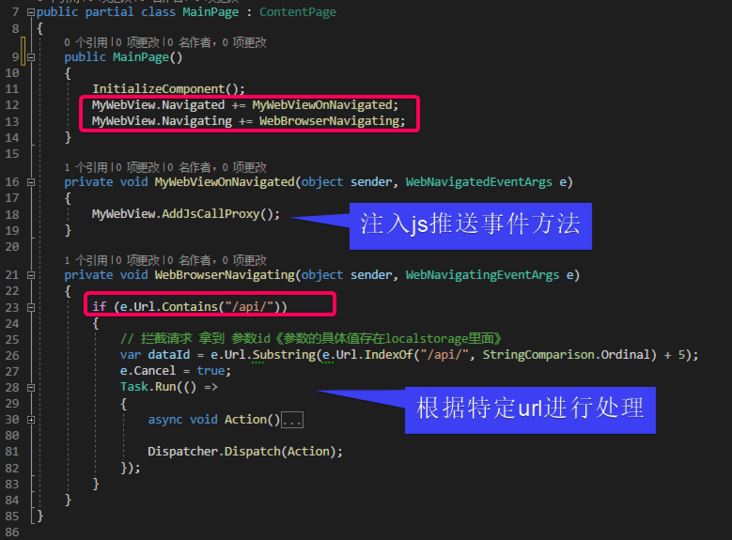
这么封装后,js 和 csharp 的互相调用就很方便了。
ch@tgpt 的开放 api 调用
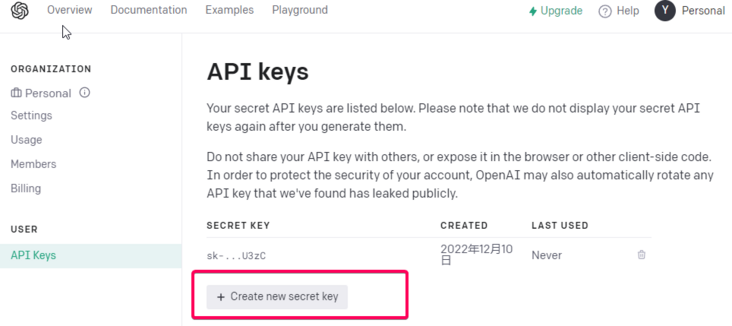
注册好 ch@tgpt 后可以申请一个 APIKEY。
API 封装:
public static async Task<CompletionsResponse> GetResponseDataAsync(string prompt){// Set up the API URL and API keystring apiUrl = "https://api.*open**ai.com/v1/completions"; // Get the request body JSONdecimal temperature = decimal.Parse(Setting.Temperature, CultureInfo.InvariantCulture);int maxTokens = int.Parse(Setting.MaxTokens, CultureInfo.InvariantCulture);string requestBodyJson = GetRequestBodyJson(prompt, temperature, maxTokens); // Send the API request and get the response datareturn await SendApiRequestAsync(apiUrl, Setting.ApiKey, requestBodyJson);} private static string GetRequestBodyJson(string prompt, decimal temperature, int maxTokens){// Set up the request bodyvar requestBody = new CompletionsRequestBody{Model = "text-davinci-003",Prompt = prompt,Temperature = temperature,MaxTokens = maxTokens,TopP = 1.0m,FrequencyPenalty = 0.0m,PresencePenalty = 0.0m,N = 1,Stop = "[END]",}; // Create a new JsonSerializerOptions object with the IgnoreNullValues and IgnoreReadOnlyProperties properties set to truevar serializerOptions = new JsonSerializerOptions{IgnoreNullValues = true,IgnoreReadOnlyProperties = true,}; // Serialize the request body to JSON using the JsonSerializer.Serialize method overload that takes a JsonSerializerOptions parameterreturn JsonSerializer.Serialize(requestBody, serializerOptions);} private static async Task<CompletionsResponse> SendApiRequestAsync(string apiUrl, string apiKey, string requestBodyJson){// Create a new HttpClient for making the API requestusing HttpClient client = new HttpClient(); // Set the API key in the request headersclient.DefaultRequestHeaders.Add("Authorization", "Bearer " + apiKey); // Create a new StringContent object with the JSON payload and the correct content typeStringContent content = new StringContent(requestBodyJson, Encoding.UTF8, "application/json"); // Send the API request and get the responseHttpResponseMessage response = await client.PostAsync(apiUrl, content); // Deserialize the responsevar responseBody = await response.Content.ReadAsStringAsync(); // Return the response datareturn JsonSerializer.Deserialize<CompletionsResponse>(responseBody);}
调用方式
var reply = await ChatService.GetResponseDataAsync('xxxxxxxxxx');
完整代码参考~
在学习 maui 的过程中,遇到问题我在 Microsoft Learn 提问,回答的效率很快,推荐大家试试看!
点我了解更多 MAUI 相关资料~
到此这篇关于使用 .NET MAUI 开发 ChatGPT 客户端的文章就介绍到这了,更多相关.NET MAUI 开发 ChatGPT 内容请搜索一聚教程网以前的文章或继续浏览下面的相关文章希望大家以后多多支持一聚教程网!