




最新下载


热门教程
- 1
- 2
- 3
- 4
- 5
- 6
- 7
- 8
- 9
- 10
如何在.Net6webapi中记录每次接口请求的日志
时间:2026-09-16 19:50:01 编辑:袖梨 来源:一聚教程网
.net6有自带的logging组件,还有很多优秀的开源log组件,如NLog,serilog,这里我们使用serilog组件来构建日志模块,这篇文章主要介绍了如何在.Net6webapi中记录每次接口请求的日志,需要的朋友可以参考下
为什么在软件设计中一定要有日志系统?
在软件设计中日志模块是必不可少的一部分,可以帮助开发人员更好的了解程序的运行情况,提高软件的可靠性,安全性和性能,日志通常能帮我们解决如下问题:
调试和故障排查:日志可以记录程序运行时的各种信息,包括错误,异常,警告等,方便开发人员在出现问题时进行调试和故障排查。性能优化:日志可以记录程序的运行时间,资源占用等信息,帮助开发人员进行性能优化。安全审计:日志可以记录用户的操作行为,方便进行安全审计和追踪。统计分析:日志可以记录用户的访问情况,使用习惯等信息,方便进行统计分析和用户行为研究。业务监控:日志可以记录业务数据的变化情况,方便进行业务监控和数据分析。数据还原:日志记录每次请求的请求及响应数据,可以在数据丢失的情况下还原数据。如何在.net6webapi中添加日志?
1.添加日志组件
.net6有自带的logging组件,还有很多优秀的开源log组件,如NLog,serilog,这里我们使用serilog组件来构建日志模块。
新建.net6,asp net web api项目之后,为其添加如下四个包
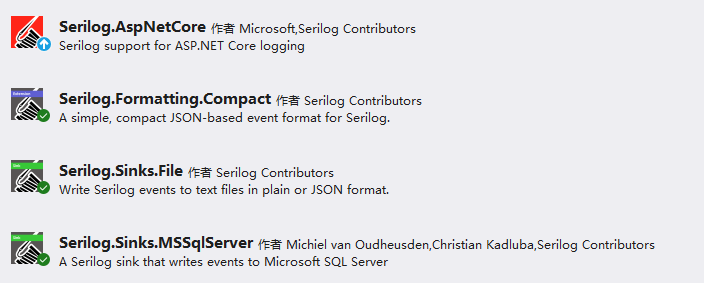
dotnet add package Serilog.AspNetCore//核心包dotnet add package Serilog.Formatting.Compactdotnet add Serilog.Sinks.File//提供记录到文件dotnet add Serilog.Sinks.MSSqlServer//提供记录到sqlserver
2.新建SeriLogExtend扩展类型,配置日志格式并注入
public static class SeriLogExtend{public static void AddSerilLog(this ConfigureHostBuilder configureHostBuilder){//输出模板string outputTemplate = "{NewLine}【{Level:u3}】{Timestamp:yyyy-MM-dd HH:mm:ss.fff}" +"{NewLine}#Msg#{Message:lj}" +"{NewLine}#Pro #{Properties:j}" +"{NewLine}#Exc#{Exception}" + new string('-', 50);// 配置SerilogLog.Logger = new LoggerConfiguration().MinimumLevel.Override("Microsoft", LogEventLevel.Warning) // 排除Microsoft的日志.Enrich.FromLogContext() // 注册日志上下文.WriteTo.Console(outputTemplate: outputTemplate) // 输出到控制台.WriteTo.MSSqlServer("Server=.;Database=testdb;User ID=sa;Password=123;TrustServerCertificate=true", sinkOptions: GetSqlServerSinkOptions(), columnOptions: GetColumnOptions()).WriteTo.Logger(configure => configure // 输出到文件.MinimumLevel.Debug().WriteTo.File(//单个日志文件,总日志,所有日志存到这里面$"logs\log.txt",rollingInterval: RollingInterval.Day,outputTemplate: outputTemplate).WriteTo.File( //每天生成一个新的日志,按天来存日志"logs\{Date}-log.txt", //定输出到滚动日志文件中,每天会创建一个新的日志,按天来存日志retainedFileCountLimit: 7,outputTemplate: outputTemplate)).CreateLogger();configureHostBuilder.UseSerilog(Log.Logger); // 注册serilog/// <summary>/// 设置日志sqlserver配置/// </summary>/// <returns></returns>MSSqlServerSinkOptions GetSqlServerSinkOptions(){var sqlsinkotpions = new MSSqlServerSinkOptions();sqlsinkotpions.TableName = "sys_Serilog";//表名称sqlsinkotpions.SchemaName = "dbo";//数据库模式sqlsinkotpions.AutoCreateSqlTable = true;//是否自动创建表return sqlsinkotpions;}/// <summary>/// 设置日志sqlserver 列配置/// </summary>/// <returns></returns>ColumnOptions GetColumnOptions(){var customColumnOptions = new ColumnOptions();customColumnOptions.Store.Remove(StandardColumn.MessageTemplate);//删除多余的这两列customColumnOptions.Store.Remove(StandardColumn.Properties);var columlist = new List<SqlColumn>();columlist.Add(new SqlColumn("RequestJson", SqlDbType.NVarChar, true, 2000));//添加一列,用于记录请求参数stringcolumlist.Add(new SqlColumn("ResponseJson", SqlDbType.NVarChar, true, 2000));//添加一列,用于记录响应数据customColumnOptions.AdditionalColumns = columlist;return customColumnOptions;}}}
然后再program.cs中调用这个扩展方法
var builder = WebApplication.CreateBuilder(args);// Add services to the container.builder.Services.AddControllers(options =>{options.Filters.Add(typeof(RequestLoggingFilter));});// Learn more about configuring Swagger/OpenAPI at https://*aka.m*s*/aspnetcore/swashbucklebuilder.Services.AddEndpointsApiExplorer();builder.Services.AddSwaggerGen();builder.Host.AddSerilLog();var app = builder.Build();// Configure the HTTP request pipeline.if (app.Environment.IsDevelopment()){app.UseSwagger();app.UseSwaggerUI();}app.UseHttpsRedirection();app.UseAuthorization();app.MapControllers();app.Run();
这里我设计的日志信息只包括了
Message:日志信息Level:等级TimeStamp:记录日志时间Exception:异常信息RequestJson:请求参数jsonResponseJson:响应结果json其中前面四种为日志默认,后两种为我主动添加,在实际的设计中还有可能有不同的信息,如:
IP:请求日志Action:请求方法Token:请求tokenUser:请求的用户日志的设计应该根据实际的情况而来,其应做到足够详尽,能帮助开发者定位,解决问题,而又不能过于重复臃肿,白白占用系统空间,我这边的示例仅供大家参考
3.添加RequestLoggingFilter过滤器,用以记录每次请求的日志
public class RequestLoggingFilter : IActionFilter{private readonly Serilog.ILogger _logger;//注入serilogprivate Stopwatch _stopwatch;//统计程序耗时public RequestLoggingFilter(Serilog.ILogger logger){_logger = logger;_stopwatch = Stopwatch.StartNew();}public void OnActionExecuted(ActionExecutedContext context){_stopwatch.Stop();var request = context.HttpContext.Request;var response = context.HttpContext.Response;_logger.ForContext("RequestJson",request.QueryString)//请求字符串.ForContext("ResponseJson", JsonConvert.SerializeObject(context.Result))//响应数据json.Information("Request {Method} {Path} responded {StatusCode} in {Elapsed:0.0000} ms",//messagerequest.Method,request.Path,response.StatusCode,_stopwatch.Elapsed.TotalMilliseconds);}public void OnActionExecuting(ActionExecutingContext context){}}
在program.cs中将该过滤器添加进所有控制器之中
builder.Services.AddControllers(options =>{options.Filters.Add(typeof(RequestLoggingFilter));});// Learn more about configuring Swagger/OpenAPI at https://*aka.m*s*/aspnetcore/swashbucklebuilder.Services.AddEndpointsApiExplorer();builder.Services.AddSwaggerGen();builder.Host.AddSerilLog();var app = builder.Build();// Configure the HTTP request pipeline.if (app.Environment.IsDevelopment()){app.UseSwagger();app.UseSwaggerUI();}app.UseHttpsRedirection();app.UseAuthorization();app.MapControllers();app.Run();
测试效果
在控制器添加一个测试方法并将其调用一次
[HttpGet]public dynamic Get123(string model){return new { name = "123", id = 2 };}
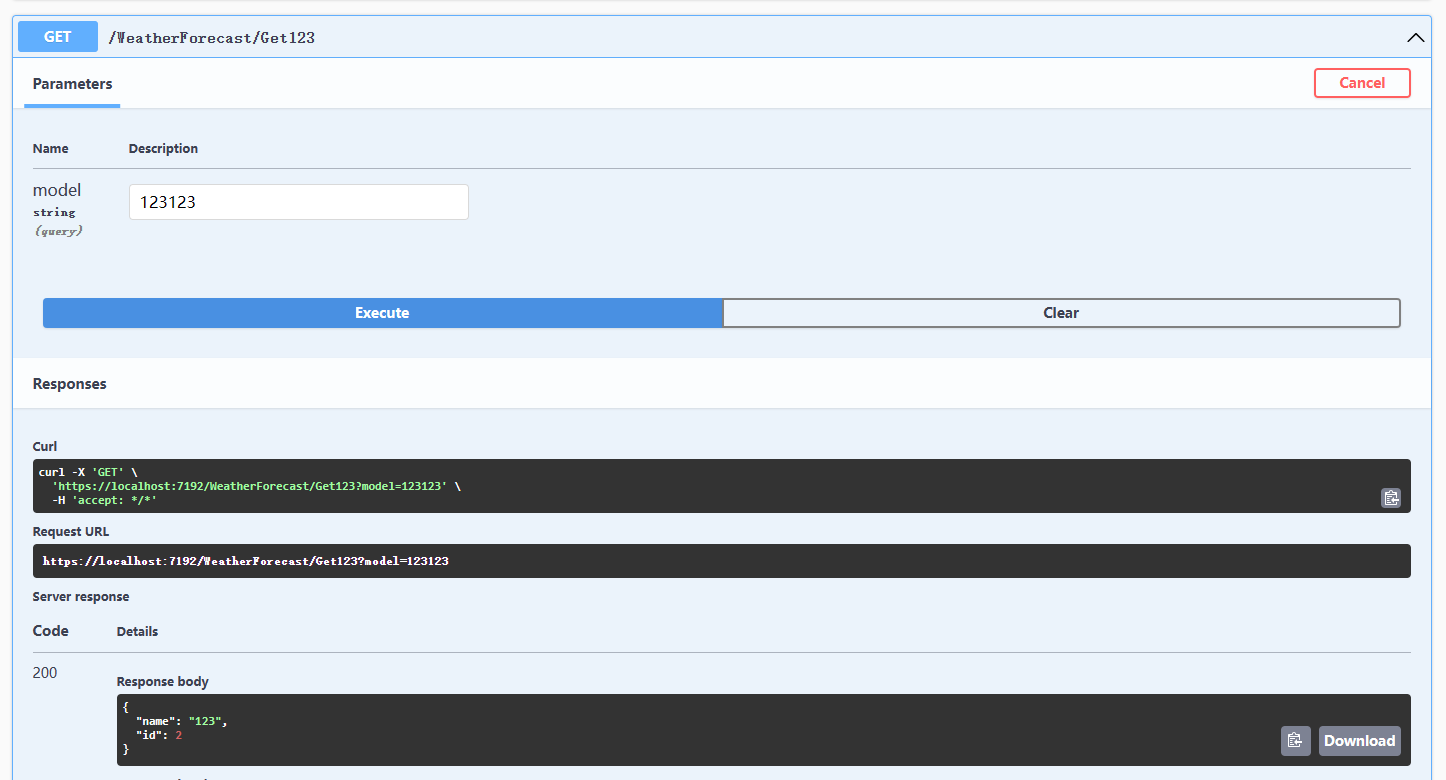
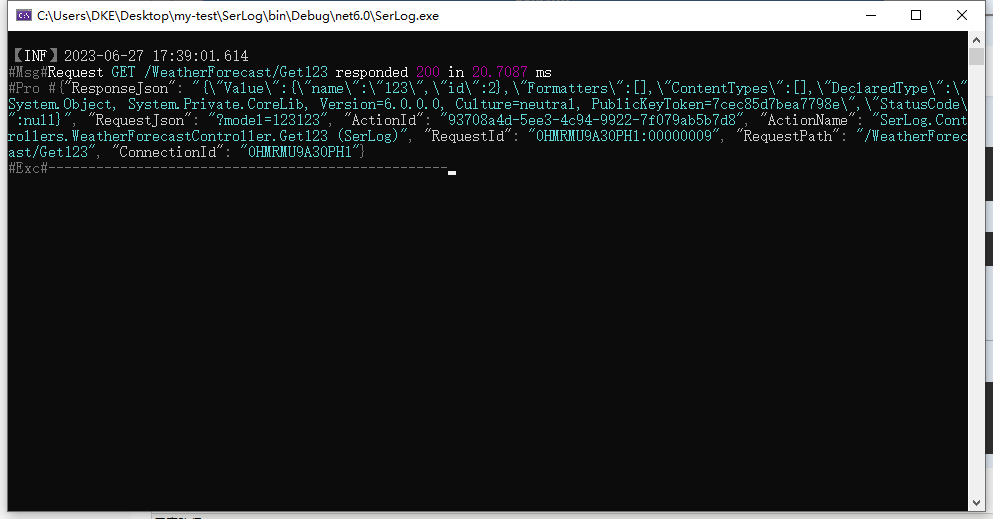
控制台输出
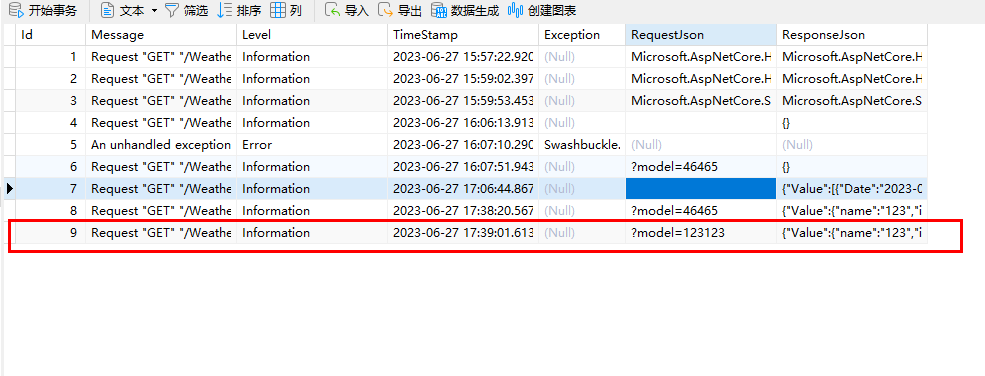
数据库记录
项目根目录下logs文件夹中日志文件记录
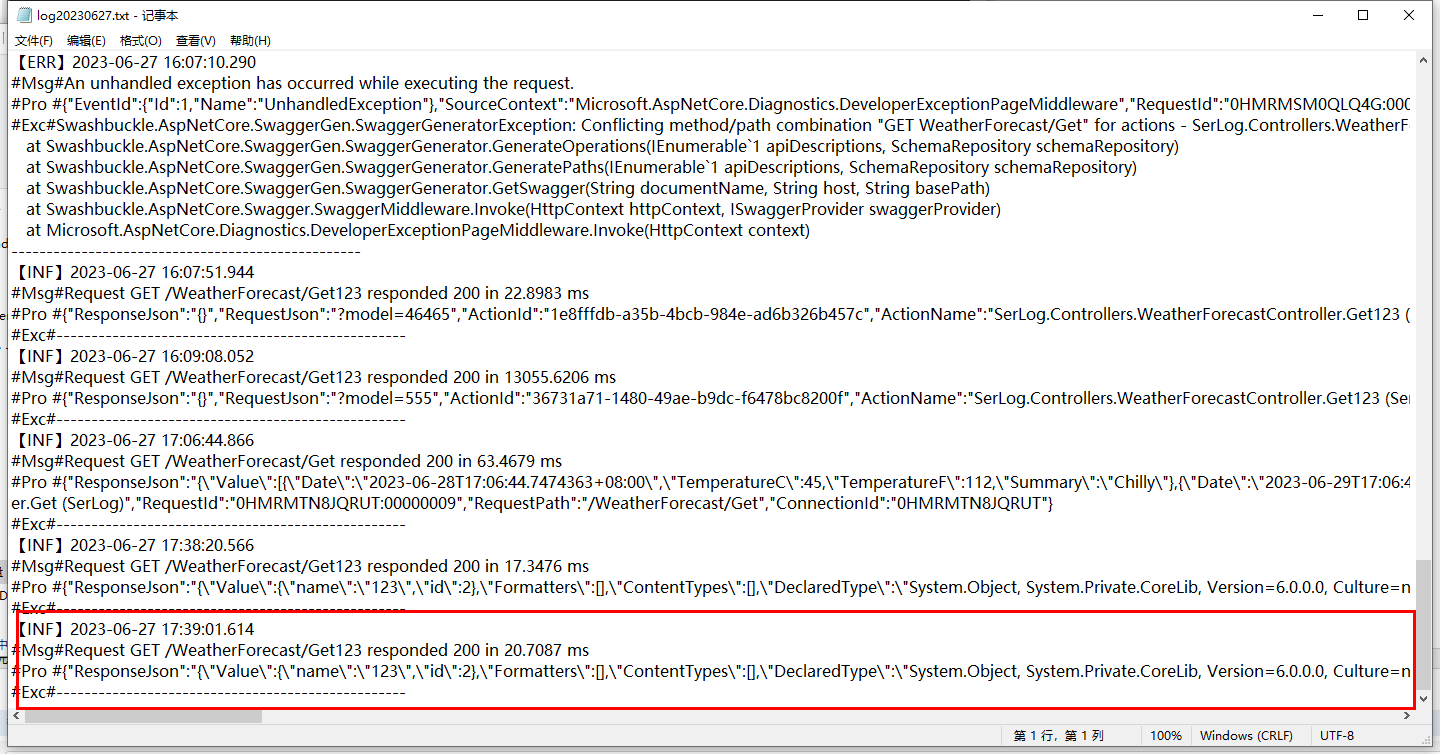
到此这篇关于如何在.Net6 web api中记录每次接口请求的日志的文章就介绍到这了,更多相关.net记录每次接口请求的日志内容请搜索一聚教程网以前的文章或继续浏览下面的相关文章希望大家以后多多支持一聚教程网!
相关文章
- ASP.NETCore基础之中间件 09-16
- ASP.NETCore应用程序配置文件AppSetting.json 09-16
- 如何在.net6webapi中使用自动依赖注入 09-16
- .Net加密神器Eazfuscator.NET 2023.2 最新版使用教程 09-16
- 如何在.Net6webapi中记录每次接口请求的日志 09-16
- .net中string类型可以作为lock的锁对象吗 09-16