




最新下载


热门教程
- 1
- 2
- 3
- 4
- 5
- 6
- 7
- 8
- 9
- 10
ADO.NET基础知识详解
时间:2026-09-17 17:20:01 编辑:袖梨 来源:一聚教程网
ADO.NET是微软提供的一种数据库访问技术。
ADO.NET为不同类型的数据源提供了不同的数据提供程序对象:
数据提供程序中包含了ADO.NET的四个核心对象:
ADO.NET提供两种方式访问数据库:
连接式访问:整个操作过程中需要保持数据库连接。
断开式访问:只需要在执行数据库命令时保持数据库连接。
一、使用DataReader读取数据
使用DataReader读取数据属于连接式读取,只能只进的一行一行读取数据,并且不能改变数据,如需要改变数据,必须重新执行insert,update,delete等sql语句来改变数据。
示例:使用DataReader读取数据在ListView控件显示:
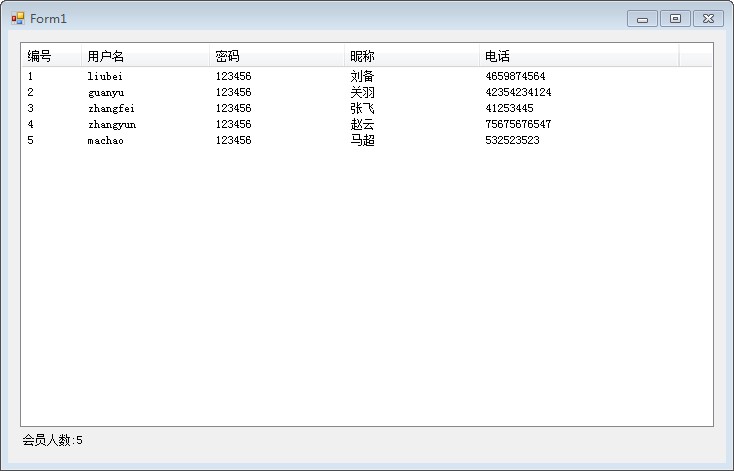
此示例的测试数据如下:
create table Member(MemberId int primary key identity(1,1),MemberAccount nvarchar(20) unique check(len(MemberAccount) between 6 and 12),MemberPwd nvarchar(20),MemberName nvarchar(20),MemberPhone nvarchar(20))insert into Member(MemberAccount,MemberPwd,MemberName,MemberPhone)values('liubei','123456','刘备','4659874564')insert into Member(MemberAccount,MemberPwd,MemberName,MemberPhone)values('guanyu','123456','关羽','42354234124')insert into Member(MemberAccount,MemberPwd,MemberName,MemberPhone)values('zhangfei','123456','张飞','41253445')insert into Member(MemberAccount,MemberPwd,MemberName,MemberPhone)values('zhangyun','123456','赵云','75675676547')insert into Member(MemberAccount,MemberPwd,MemberName,MemberPhone)values('machao','123456','马超','532523523')此示例代码如下:
在编写代码之前需要进行ListView控件的编辑列操作,并且将视图模式切换成Details模式。
private void Form1_Load(object sender, EventArgs e){//1-编写连接字符串(windows方式连接)string connStr = "Integrated Security=SSPI;Persist Security Info=False;Initial Catalog=DBTEST;Data Source=.";//2-创建连接对象,打开数据库连接SqlConnection conn = new SqlConnection(connStr);conn.Open();//3-编写sql语句string sql = "select * from Member";//4-定义执行命令的对象执行命令SqlCommand cmd = new SqlCommand(sql, conn);//5-利用DataReader读取数据SqlDataReader rd = cmd.ExecuteReader();while (rd.Read()){ListViewItem item = new ListViewItem(rd["MemberId"].ToString());item.SubItems.Add(rd["MemberAccount"].ToString());item.SubItems.Add(rd["MemberPwd"].ToString());item.SubItems.Add(rd["MemberName"].ToString());item.SubItems.Add(rd["MemberPhone"].ToString());this.listView1.Items.Add(item);}rd.Close();//显示人数cmd.CommandText = "select count(*) from Member";int count = (int)cmd.ExecuteScalar();this.lblCount.Text = "会员人数:" + count;conn.Close();}二、使用DataAdapter的方式抽取数据
DataSet是特意为独立于所有数据源的数据访问而设计的,可以理解成内存中的数据库。
在支持ADO.NET的断开式、分布式数据方案中起着重要的作用。
DataSet是数据驻留在内存中的表现形式,无论是什么数据源,它都可以提供一致的编程模型。
DataSet支持改变数据然后回传给数据库。
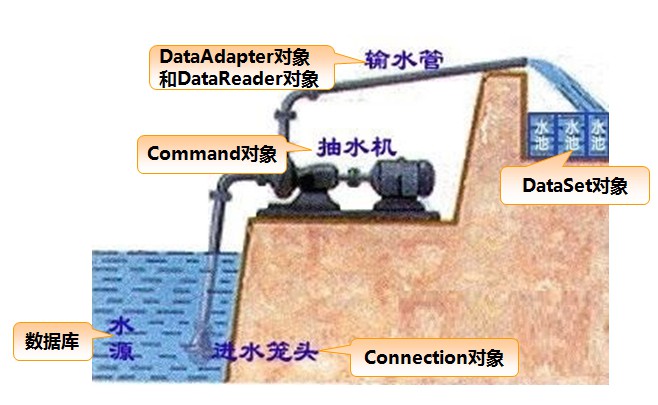
示例:使用DataAdapter抽取数据到DataTable中,在DataGridView中进行显示
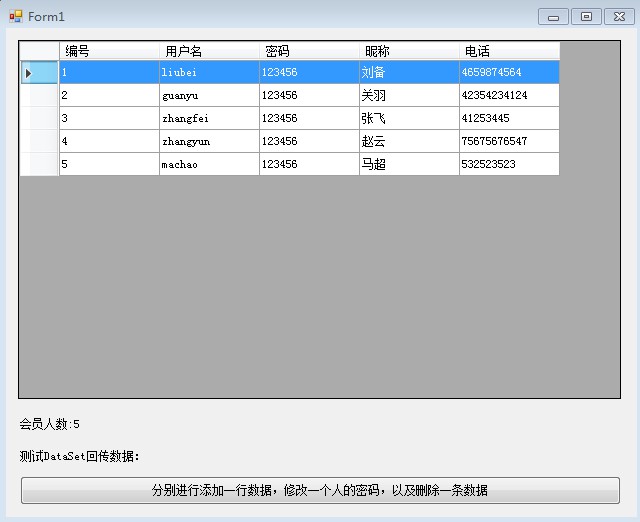
此示例的测试数据与文档第一部分测试数据相同。
此示例代码如下:
在编写代码之前需要对DataGridView控件进行编辑列操作。
设置DataGridView控件的AllowUserToAddRows=False实现清楚最后一个空行,SelectionMode=FullRowSelect实现整行选中模式,用户体验更好。
//窗体加载事件private void Form1_Load(object sender, EventArgs e){//1-定义连接字符串 //string connStr = "Integrated Security=SSPI;Persist Security Info=False;Initial Catalog=DBTEST;Data Source=.";//2-编写连接字符串(sql用户名密码方式连接)string connStr = "server=.;database=DBTEST;uid=sa;pwd=123456";//2-定义连接对象,打开连接SqlConnection conn = new SqlConnection(connStr);conn.Open();//3-编写sql语句string sql = "select * from Member";//4-数据适配器抽取信息SqlDataAdapter adp = new SqlDataAdapter(sql, conn);DataTable dt = new DataTable();//数据表格adp.Fill(dt);this.dataGridView1.AutoGenerateColumns = false; //自动列取消this.dataGridView1.DataSource = dt;//显示人数adp.SelectCommand.CommandText = "select count(*) from Member";int count = (int)adp.SelectCommand.ExecuteScalar();this.lblCount.Text = "会员人数:" + count;conn.Close();}//修改数据后跟新数据库的按钮事件private void btUpdate_Click(object sender, EventArgs e){//1-定义连接字符串 //string connStr = "Integrated Security=SSPI;Persist Security Info=False;Initial Catalog=DBTEST;Data Source=.";//2-编写连接字符串(sql用户名密码方式连接)string connStr = "server=.;database=DBTEST;uid=sa;pwd=123456";//2-定义连接对象,打开连接SqlConnection conn = new SqlConnection(connStr);conn.Open();//3-编写sql语句string sql = "select * from Member";//4-数据适配器抽取信息SqlDataAdapter adp = new SqlDataAdapter(sql, conn);DataTable dt = new DataTable();//数据表格adp.Fill(dt);//添加一条数据DataRow dr = dt.NewRow();dr["MemberAccount"] = "weiyan";dr["MemberPwd"] = "123456";dr["MemberName"] = "魏延";dr["MemberPhone"] = "15352565585";dt.Rows.Add(dr);//修改一条数据dt.Rows[1]["MemberPwd"] = "654321";//删除一条数据dt.Rows[4].Delete();//跟新数据到数据库SqlCommandBuilder sqlBuilder = new SqlCommandBuilder(adp);adp.Update(dt);//确认DataTable的数据变化,并且重新绑定到控件dt.AcceptChanges();this.dataGridView1.DataSource = dt;MessageBox.Show("数据跟新成功!");}三、非查询操作
非查询操作分为"添加","删除","修改"操作,这些操作处理sql语句不同,其他编码是一样的,所以在此文档中以添加操作为例介绍非查询操作。
示例:添加会员信息
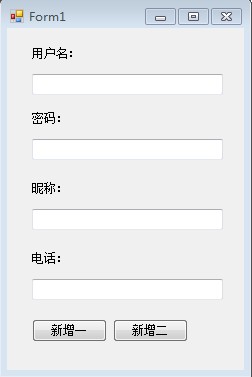
此示例的测试数据与文档第一部分测试数据相同。
此示例中通过两种方式添加数据:
(1)使用DataAdapter的command跟新数据(2)直接使用SqlCommand对象跟新数据此示例代码如下:
//方案一:使用DataAdapter的command跟新数据private void btAdd1_Click(object sender, EventArgs e){//1-定义连接字符串 //string connStr = "Integrated Security=SSPI;Persist Security Info=False;Initial Catalog=DBTEST;Data Source=.";//2-编写连接字符串(sql用户名密码方式连接)string connStr = "server=.;database=DBTEST;uid=sa;pwd=123456";//2-定义连接对象,打开连接SqlConnection conn = new SqlConnection(connStr);conn.Open();//3-编写sql语句string sql = string.Format("insert into Member(MemberAccount,MemberPwd,MemberName,MemberPhone)values('{0}', '{1}', '{2}', '{3}')", this.txtAccount.Text, this.txtPwd.Text, this.txtNickName.Text, this.txtPhone.Text);//4-数据适配器SqlDataAdapter adp = new SqlDataAdapter(sql, conn);//执行sql语句int rowCount = adp.SelectCommand.ExecuteNonQuery();conn.Close();if(rowCount == 1)MessageBox.Show("添加成功!");elseMessageBox.Show("添加失败!");}//方案二:直接使用SqlCommand对象跟新数据private void btAdd2_Click(object sender, EventArgs e){//1-编写连接字符串(windows方式连接)//string connStr = "Integrated Security=SSPI;Persist Security Info=False;Initial Catalog=DBTEST;Data Source=.";//2-编写连接字符串(sql用户名密码方式连接)string connStr = "server=.;database=DBTEST;uid=sa;pwd=123456";//2-创建连接对象,打开数据库连接SqlConnection conn = new SqlConnection(connStr);conn.Open();//3-编写sql语句string sql = string.Format("insert into Member(MemberAccount,MemberPwd,MemberName,MemberPhone)values('{0}', '{1}', '{2}', '{3}')", this.txtAccount.Text, this.txtPwd.Text, this.txtNickName.Text, this.txtPhone.Text);//4-定义执行命令的对象执行命令SqlCommand cmd = new SqlCommand(sql, conn);int rowCount = cmd.ExecuteNonQuery();conn.Close();if (rowCount == 1)MessageBox.Show("添加成功!");elseMessageBox.Show("添加失败!");}四、一个窗体中实现会员信息的增加,删除,修改,查询操作
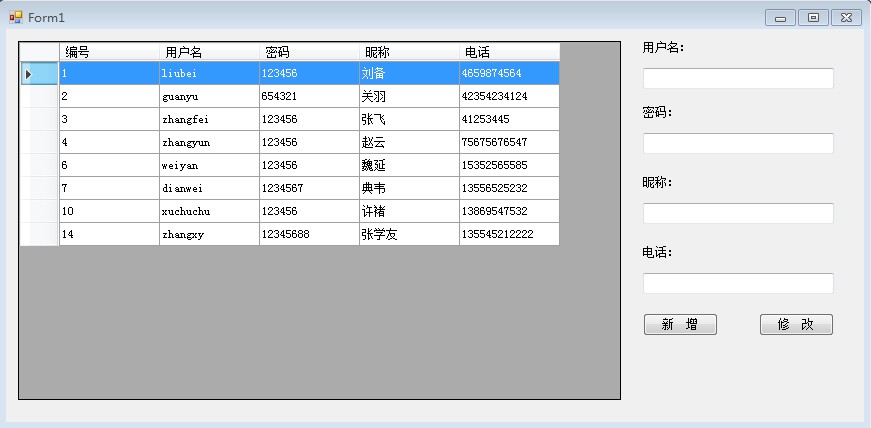
此示例的测试数据与文档第一部分测试数据相同。
业务需求:
(1)窗体加载的时候显示数据。(2)输入字段内容,点击新增按钮,可以添加数据(3)鼠标选中一行,右键弹出删除菜单,可以删除数据(4)鼠标选中一行,将会员信息在右侧文本框中显示,重新编辑后可以点击修改按钮实现数据的修改代码如下:
绑定数据的通用方法:
//绑定数据的方法private void BindData(){//1-定义连接字符串 //string connStr = "Integrated Security=SSPI;Persist Security Info=False;Initial Catalog=DBTEST;Data Source=.";//2-编写连接字符串(sql用户名密码方式连接)string connStr = "server=.;database=DBTEST;uid=sa;pwd=123456";//2-定义连接对象,打开连接SqlConnection conn = new SqlConnection(connStr);conn.Open();//3-编写sql语句string sql = "select * from Member";//4-数据适配器抽取信息SqlDataAdapter adp = new SqlDataAdapter(sql, conn);DataTable dt = new DataTable();//数据表格adp.Fill(dt);this.dataGridView1.AutoGenerateColumns = false; //自动列取消this.dataGridView1.DataSource = dt;conn.Close();}窗体加载事件代码:
//窗体加载事件private void Form1_Load(object sender, EventArgs e){BindData();}新增按钮的点击事件代码:
//添加信息按钮事件private void btAdd_Click(object sender, EventArgs e){//1-编写连接字符串(windows方式连接)//string connStr = "Integrated Security=SSPI;Persist Security Info=False;Initial Catalog=DBTEST;Data Source=.";//2-编写连接字符串(sql用户名密码方式连接)string connStr = "server=.;database=DBTEST;uid=sa;pwd=123456";//2-创建连接对象,打开数据库连接SqlConnection conn = new SqlConnection(connStr);conn.Open();//3-编写sql语句string sql = string.Format("insert into Member(MemberAccount,MemberPwd,MemberName,MemberPhone)values('{0}', '{1}', '{2}', '{3}')", this.txtAccount.Text, this.txtPwd.Text, this.txtNickName.Text, this.txtPhone.Text);//4-定义执行命令的对象执行命令SqlCommand cmd = new SqlCommand(sql, conn);int rowCount = cmd.ExecuteNonQuery();conn.Close();if (rowCount == 1)MessageBox.Show("添加成功!");elseMessageBox.Show("添加失败!");BindData();}DataGridView控件的点击事件代码:
//网格控件的点击事件private void dataGridView1_Click(object sender, EventArgs e){//当AllowUserToAddRows=True的时候,防止用户选择最后一个空行if (this.dataGridView1.SelectedRows[0].Cells[0].Value.ToString().Equals("")){MessageBox.Show("请正确选择!");return;}int memId = int.Parse(this.dataGridView1.SelectedRows[0].Cells[0].Value.ToString());//MessageBox.Show(memId.ToString());//1-定义连接字符串 string connStr = "Integrated Security=SSPI;Persist Security Info=False;Initial Catalog=DBTEST;Data Source=.";//2-定义连接对象,打开连接SqlConnection conn = new SqlConnection(connStr);conn.Open();//3-编写sql语句string sql = "select * from Member where MemberId = " + memId;//-抽取数据SqlDataAdapter adp = new SqlDataAdapter(sql, conn);DataTable dt = new DataTable();adp.Fill(dt);conn.Close();this.txtAccount.Text = dt.Rows[0]["MemberAccount"].ToString();this.txtPwd.Text = dt.Rows[0]["MemberPwd"].ToString();this.txtNickName.Text = dt.Rows[0]["MemberName"].ToString();this.txtPhone.Text = dt.Rows[0]["MemberPhone"].ToString();}修改按钮的点击事件代码:
//修改按钮的点击事件private void btUpdate_Click(object sender, EventArgs e){int memId = int.Parse(this.dataGridView1.SelectedRows[0].Cells[0].Value.ToString());string connStr = "Integrated Security=SSPI;Persist Security Info=False;Initial Catalog=DBTEST;Data Source=.";SqlConnection conn = new SqlConnection(connStr);conn.Open();string sql = string.Format("update Member set MemberAccount='{0}',MemberPwd='{1}',MemberName='{2}',MemberPhone='{3}' where MemberId='{4}'", this.txtAccount.Text, this.txtPwd.Text, this.txtNickName.Text, this.txtPhone.Text, memId);SqlCommand cmd = new SqlCommand(sql, conn);int rowCount = cmd.ExecuteNonQuery();conn.Close();if (rowCount == 1)MessageBox.Show("修改成功!");elseMessageBox.Show("修改失败!");BindData();}//删除菜单的点击事件代码:
//删除信息弹出菜单事件private void 删除ToolStripMenuItem_Click(object sender, EventArgs e){DialogResult r = MessageBox.Show("您确定要删除吗?", "****系统", MessageBoxButtons.YesNo);if (r == System.Windows.Forms.DialogResult.No){return;}int memId = int.Parse(this.dataGridView1.SelectedRows[0].Cells[0].Value.ToString());string connStr = "Integrated Security=SSPI;Persist Security Info=False;Initial Catalog=DBTEST;Data Source=.";SqlConnection conn = new SqlConnection(connStr);conn.Open();string sql = "delete from Member where MemberId = " + memId;SqlCommand cmd = new SqlCommand(sql, conn);int rowCount = cmd.ExecuteNonQuery();conn.Close();if (rowCount == 1)MessageBox.Show("删除成功!");elseMessageBox.Show("删除失败!");BindData();}五、多个窗体中实现会员信息的增加,删除,修改,查询操作
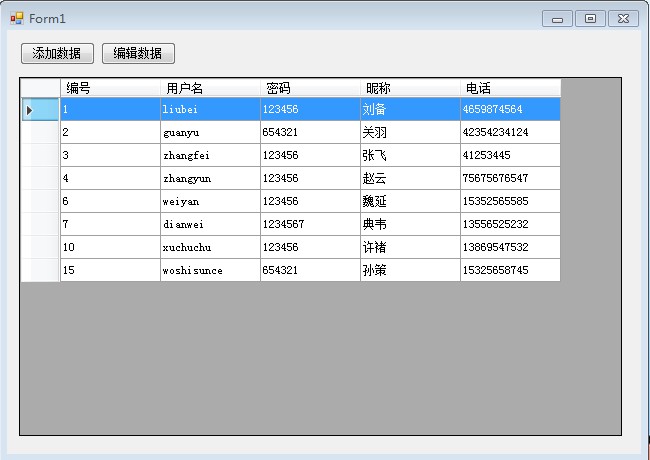
此示例的测试数据与文档第一部分测试数据相同。
业务需求:
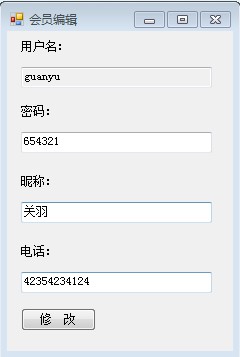
(1)窗体加载的时候显示数据。(2)点击"添加数据"按钮,弹出新窗体,在新窗体中进行数据的添加,添加完成后自动刷新表格数据。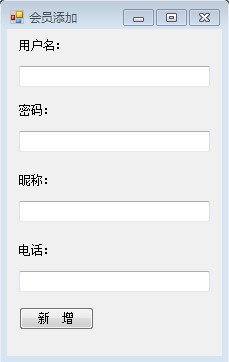
实现步骤如下:
(1)查询窗体显示数据代码:
//绑定数据的方法public void BindData(){//1-定义连接字符串 //string connStr = "Integrated Security=SSPI;Persist Security Info=False;Initial Catalog=DBTEST;Data Source=.";//2-编写连接字符串(sql用户名密码方式连接)string connStr = "server=.;database=DBTEST;uid=sa;pwd=123456";//2-定义连接对象,打开连接SqlConnection conn = new SqlConnection(connStr);conn.Open();//3-编写sql语句string sql = "select * from Member";//4-数据适配器抽取信息SqlDataAdapter adp = new SqlDataAdapter(sql, conn);DataTable dt = new DataTable();//数据表格adp.Fill(dt);this.dataGridView1.AutoGenerateColumns = false; //自动列取消this.dataGridView1.DataSource = dt;conn.Close();}private void FrmSelect_Load(object sender, EventArgs e){BindData();}(2)"删除"菜单代码:
private void 删除ToolStripMenuItem_Click(object sender, EventArgs e){DialogResult r = MessageBox.Show("您确定要删除吗?", "****系统", MessageBoxButtons.YesNo);if (r == System.Windows.Forms.DialogResult.No){return;}int memId = int.Parse(this.dataGridView1.SelectedRows[0].Cells[0].Value.ToString());string connStr = "Integrated Security=SSPI;Persist Security Info=False;Initial Catalog=DBTEST;Data Source=.";SqlConnection conn = new SqlConnection(connStr);conn.Open();string sql = "delete from Member where MemberId = " + memId;SqlCommand cmd = new SqlCommand(sql, conn);int rowCount = cmd.ExecuteNonQuery();conn.Close();if (rowCount == 1)MessageBox.Show("删除成功!");elseMessageBox.Show("删除失败!");BindData();}(3)会员添加窗体代码:
private void btAdd_Click(object sender, EventArgs e){//1-编写连接字符串(windows方式连接)//string connStr = "Integrated Security=SSPI;Persist Security Info=False;Initial Catalog=DBTEST;Data Source=.";//2-编写连接字符串(sql用户名密码方式连接)string connStr = "server=.;database=DBTEST;uid=sa;pwd=123456";//2-创建连接对象,打开数据库连接SqlConnection conn = new SqlConnection(connStr);conn.Open();//3-编写sql语句string sql = string.Format("insert into Member(MemberAccount,MemberPwd,MemberName,MemberPhone)values('{0}', '{1}', '{2}', '{3}')", this.txtAccount.Text, this.txtPwd.Text, this.txtNickName.Text, this.txtPhone.Text);//4-定义执行命令的对象执行命令SqlCommand cmd = new SqlCommand(sql, conn);int rowCount = cmd.ExecuteNonQuery();conn.Close();if (rowCount == 1)MessageBox.Show("添加成功!");elseMessageBox.Show("添加失败!");//刷新查询窗体数据并关闭当前窗体((FrmSelect)this.Owner).BindData();this.Close();}(4)会员编辑窗体代码:
public int MemId { get; set; }//接受外部传递过来的会员编号//绑定会员详情到文本框private void BindDetail(){//1-定义连接字符串 string connStr = "Integrated Security=SSPI;Persist Security Info=False;Initial Catalog=DBTEST;Data Source=.";//2-定义连接对象,打开连接SqlConnection conn = new SqlConnection(connStr);conn.Open();//3-编写sql语句string sql = "select * from Member where MemberId = " + this.MemId;//-抽取数据SqlDataAdapter adp = new SqlDataAdapter(sql, conn);DataTable dt = new DataTable();adp.Fill(dt);conn.Close();this.txtAccount.Text = dt.Rows[0]["MemberAccount"].ToString();this.txtPwd.Text = dt.Rows[0]["MemberPwd"].ToString();this.txtNickName.Text = dt.Rows[0]["MemberName"].ToString();this.txtPhone.Text = dt.Rows[0]["MemberPhone"].ToString();}private void FrmEdit_Load(object sender, EventArgs e){BindDetail();}private void btUpdate_Click(object sender, EventArgs e){string connStr = "Integrated Security=SSPI;Persist Security Info=False;Initial Catalog=DBTEST;Data Source=.";SqlConnection conn = new SqlConnection(connStr);conn.Open();string sql = string.Format("update Member set MemberAccount='{0}',MemberPwd='{1}',MemberName='{2}',MemberPhone='{3}' where MemberId='{4}'", this.txtAccount.Text, this.txtPwd.Text, this.txtNickName.Text, this.txtPhone.Text, this.MemId);SqlCommand cmd = new SqlCommand(sql, conn);int rowCount = cmd.ExecuteNonQuery();conn.Close();if (rowCount == 1)MessageBox.Show("修改成功!");elseMessageBox.Show("修改失败!");//刷新查询窗体数据并关闭当前窗体((FrmSelect)this.Owner).BindData();this.Close();}(5)查询窗体"添加数据"和"编辑数据"按钮的代码:
private void btAdd_Click(object sender, EventArgs e){FrmAdd frm = new FrmAdd();frm.Owner = this;frm.Show();}private void btEdit_Click(object sender, EventArgs e){if (this.dataGridView1.SelectedRows[0].Cells[0].Value.ToString().Equals("")){MessageBox.Show("请正确选择!");return;}int memId = int.Parse(this.dataGridView1.SelectedRows[0].Cells[0].Value.ToString());FrmEdit frm = new FrmEdit();frm.MemId = memId;frm.Owner = this;frm.Show();}到此这篇关于ADO.NET基础知识的文章就介绍到这了。希望对大家的学习有所帮助,也希望大家多多支持一聚教程网。