




最新下载


热门教程
- 1
- 2
- 3
- 4
- 5
- 6
- 7
- 8
- 9
- 10
ASP.NET处理HTTP请求的流程IHttpModule、IHttpHandler与管道事件
时间:2026-09-17 18:30:01 编辑:袖梨 来源:一聚教程网
一、ASP.NET处理管道
Asp.net处理管道的第一步是创建HttpWorkerRequest对象,它包含于当前请求有关的所有信息。HttpWorkerRequest把请求传递给HttpRuntime类的静态ProcessRequest方法。HttpRuntime首先要做的事是创建HttpContext对象,并用HttpWorkerRequest进行初始化。创建了HttpContext实例之后,HttpRuntime类就通过调用HttpApplicationFactory的静态GetApplicationInstance()方法,为该应用程序请求HttpApplication派生类的一个示例。GetApplicationInstance()方法要么创建一个HttpApplication类的一个新实例,要么从应用程序对象池中取出一个实例。在创建完成HttpApplication实例之后,就对它进行初始化,并在初始化期间分配应用程序定义的所有模块。模块式实现IHttpModule接口的类,作用就是为了实现那经典的19个标准处理事件。在创建了模块之后,HttpRuntime类通过调用它的BeginProcessRequest方法,要求最新检索到的HttpApplication类对当前请求提供服务。然后,为当前请求找到合适的处理程序工厂。创建处理程序,传递当前HttpContext,一旦ProcessRequest方法返回,请求完成。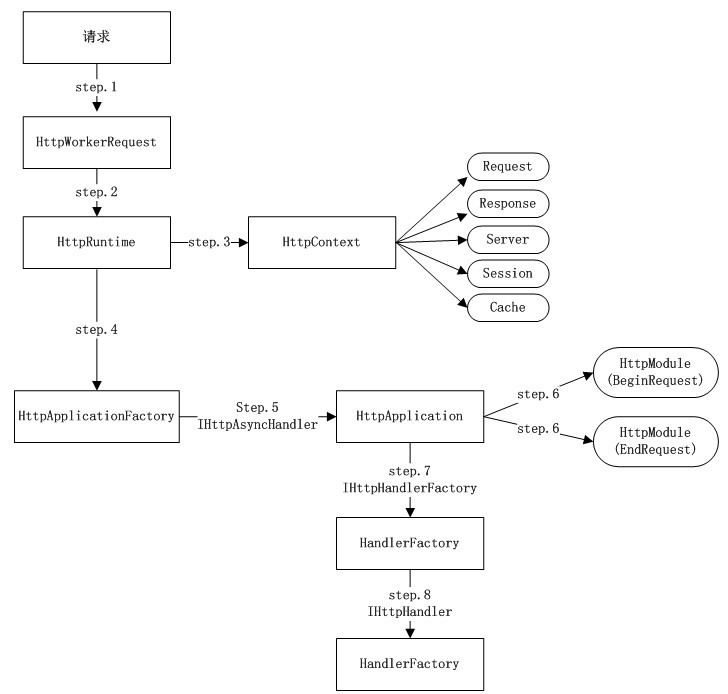
二、IHttpHandler
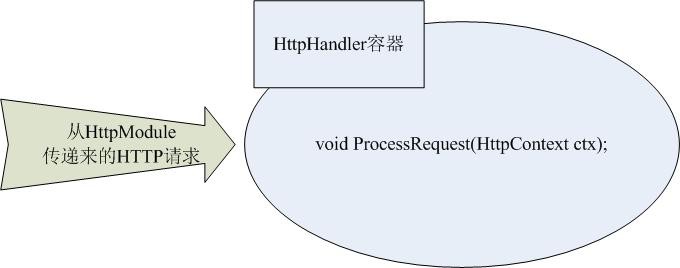
HttpHandler是asp.net真正处理Http请求的地方。在这个HttpHandler容器中,ASP.NET Framework才真正地对客户端请求的服务器页面做出编译和执行,并将处理过后的信息附加在HTTP请求信息流中再次返回到HttpModule中。
当一个HTTP请求经过HttpModule容器传递到HttpHandler容器中时,ASP.NET Framework会调用HttpHandler的ProcessRequest成员方法来对这个HTTP请求进行真正的处理。并将处理完成的结果继续经由HttpModule传递下去,直至到达客户端。
HttpHandler与HttpModule不同,一旦定义了自己的HttpHandler类,那么它对系统的HttpHandler的关系将是“覆盖”关系。
应用1:图片防盗链(实现一个自定义的IHttpHandler)
第一:定义一个实现了IHttpHandler的类,并且实现其ProcessRequest方法。在一个HttpHandler容器中如果需要访问Session,必须实现IRequiresSessionState接口,这只是一个标记接口,没有任何方法。
public class PictureHttpHandler : IHttpHandler{public bool IsReusable{get { return true; }}public void ProcessRequest(HttpContext context){//站点的域名string myDomain = "localhost";if (context.Request.UrlReferrer == null ||context.Request.UrlReferrer.Host.ToLower().IndexOf(myDomain) < 0){//如果是通过浏览器直接访问或者是通过其他站点访问过来的,则显示“资源不存在”图片context.Response.ContentType = "image/JPEG";context.Response.WriteFile(context.Request.PhysicalApplicationPath + "/images/noimg.jpg");}else{//如果是通过站内访问的,这正常显示图片context.Response.ContentType = "image/JPEG";context.Response.WriteFile(context.Request.PhysicalPath);}}}
第二:在web.config中注册这个类,并且指定Handler处理的请求类型,把此节点插入system.web节点中
<httpHandlers><!--path中指定的是执行type中HttpHandler的访问路径。此路径可以带后缀也可以不带后缀。如果path配置为*,则会对所有的请求执行此HttpHandler--> <addverb="*" path="*.jpg" type="MyHttpHandler.PictureHttpHandler,MyHttpHandler"/></httpHandlers>
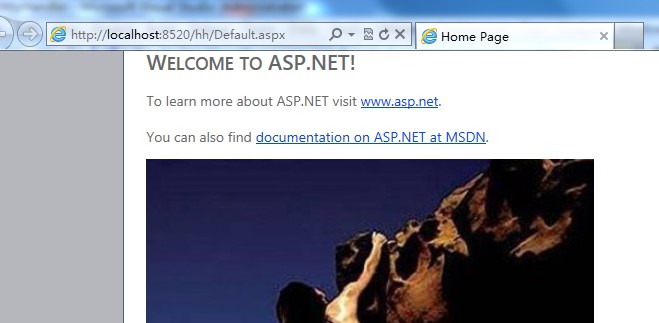
正常访问default页面时:
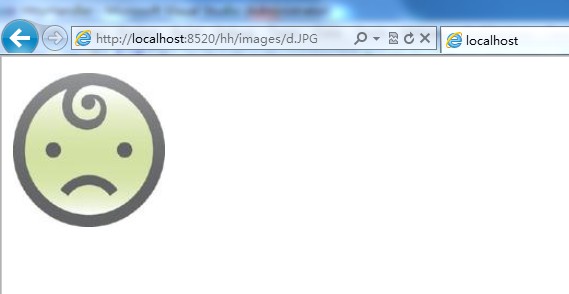
通过图片地址直接访问时:
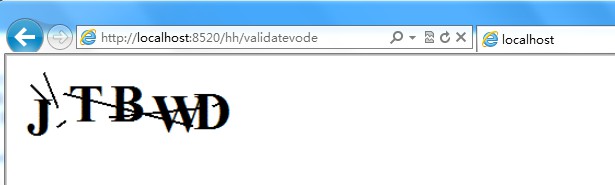
应用2、生成验证码
public class ValidateCodeHttpHandler : IHttpHandler{public void ProcessRequest(HttpContext context){context.Response.ContentType = "image/gif";//建立Bitmap对象,绘图Bitmap basemap = new Bitmap(200, 60);Graphics graph = Graphics.FromImage(basemap);graph.FillRectangle(new SolidBrush(Color.White), 0, 0, 200, 60);Font font = new Font(FontFamily.GenericSerif, 48, FontStyle.Bold, GraphicsUnit.Pixel);Random r = new Random();string letters = "ABCDEFGHIJKLMNPQRSTUVWXYZ";string letter;StringBuilder s = new StringBuilder();//添加随机的五个字母for (int x = 0; x < 5; x++){letter = letters.Substring(r.Next(0, letters.Length - 1), 1);s.Append(letter);graph.DrawString(letter, font, new SolidBrush(Color.Black), x * 38, r.Next(0, 15));}//混淆背景Pen linePen = new Pen(new SolidBrush(Color.Black), 2);for (int x = 0; x < 6; x++)graph.DrawLine(linePen, new Point(r.Next(0, 199), r.Next(0, 59)),new Point(r.Next(0, 199), r.Next(0, 59)));//将图片保存到输出流中basemap.Save(context.Response.OutputStream, ImageFormat.Gif);//context.Session["CheckCode"] = s.ToString(); //如果没有实现IRequiresSessionState,则这里会出错,也无法生成图片 context.Response.End();}public bool IsReusable{get { return true; }}}
把下面的项加到web.config中的httphandler节点中:
<addverb="*" path="validatevode" type="MyHttpHandler.ValidateCodeHttpHandler,MyHttpHandler"/>
访问validatevode时:
三、自定义HttpModule:
每次请求的开始和结束定义的HttpModule。
在Asp.net中,创建在System.Web命名空间下的IHttpModule接口专门用来定义HttpApplication对象的事件处理。实现IHttpModule接口的类称为HttpModule(Http模块)。
1、通过IHttpModule创建HttpApplication的事件处理程序
public class ModuleExample : IHttpModule{public void Init(System.Web.HttpApplication application){application.PostAuthenticateRequest += (sender, args) => { HttpContext context = ((HttpApplication)sender).Context; context.Response.Write("请求PostAuthenticate"); };application.BeginRequest += (sender, args) =>{HttpContext context = ((HttpApplication)sender).Context;context.Response.Write("请求到达");};application.EndRequest += (sender, args) =>{HttpContext context = ((HttpApplication)sender).Context;context.Response.Write("请求结束");};}public void Dispose(){throw new NotImplementedException();}}
2、注册HttpModule
在Asp.net中,实现IHttpModule接口只是实现HttpModule的第一步,在Asp.net中所使用的HttpModule还必须在网站配置文件中进行注册才能真正生效,并在Asp.net中使用。
<system.webServer><modules> <add name="ModuleExample" type="Samples.ModeleExample"></modules></system.webServer>
3、常见的HttpModule
在Asp.net中,已经预定义了许多HttpModule,甚至已经在服务器的网站配置文件中进行了注册,在系统文件夹C:WindowsMicrosoft.NETFrameworkv4.0.30319Configweb.config中看到已经注册的HttpModule如下:
<httpModules><add name="OutputCache" type="System.Web.Caching.OutputCacheModule" /><add name="Session" type="System.Web.SessionState.SessionStateModule" /><add name="WindowsAuthentication" type="System.Web.Security.WindowsAuthenticationModule" /><add name="FormsAuthentication" type="System.Web.Security.FormsAuthenticationModule" /><add name="PassportAuthentication" type="System.Web.Security.PassportAuthenticationModule" /><add name="RoleManager" type="System.Web.Security.RoleManagerModule" /> <add name="UrlAuthorization" type="System.Web.Security.UrlAuthorizationModule" /> <add name="FileAuthorization" type="System.Web.Security.FileAuthorizationModule" /> <add name="AnonymousIdentification" type="System.Web.Security.AnonymousIdentificationModule" /> <add name="Profile" type="System.Web.Profile.ProfileModule" /> <add name="ErrorHandlerModule" type="System.Web.Mobile.ErrorHandlerModule, System.Web.Mobile, Version=4.0.0.0, Culture=neutral, PublicKeyToken=b03f5f7f11d50a3a" /> <add name="ServiceModel" type="System.ServiceModel.Activation.HttpModule, System.ServiceModel.Activation, Version=4.0.0.0, Culture=neutral, PublicKeyToken=31bf3856ad364e35" /> <add name="UrlRoutingModule-4.0" type="System.Web.Routing.UrlRoutingModule" /> <add name="ScriptModule-4.0" type="System.Web.Handlers.ScriptModule, System.Web.Extensions, Version=4.0.0.0, Culture=neutral, PublicKeyToken=31bf3856ad364e35"/> </httpModules>