




最新下载


热门教程
- 1
- 2
- 3
- 4
- 5
- 6
- 7
- 8
- 9
- 10
Redis模仿手机验证码发送实现代码示例
时间:2022-06-29 10:41:46 编辑:袖梨 来源:一聚教程网
本篇文章小编给大家分享一下Redis模仿手机验证码发送实现代码示例,文章代码介绍的很详细,小编觉得挺不错的,现在分享给大家供大家参考,有需要的小伙伴们可以来看看。
具体如下:
流程图
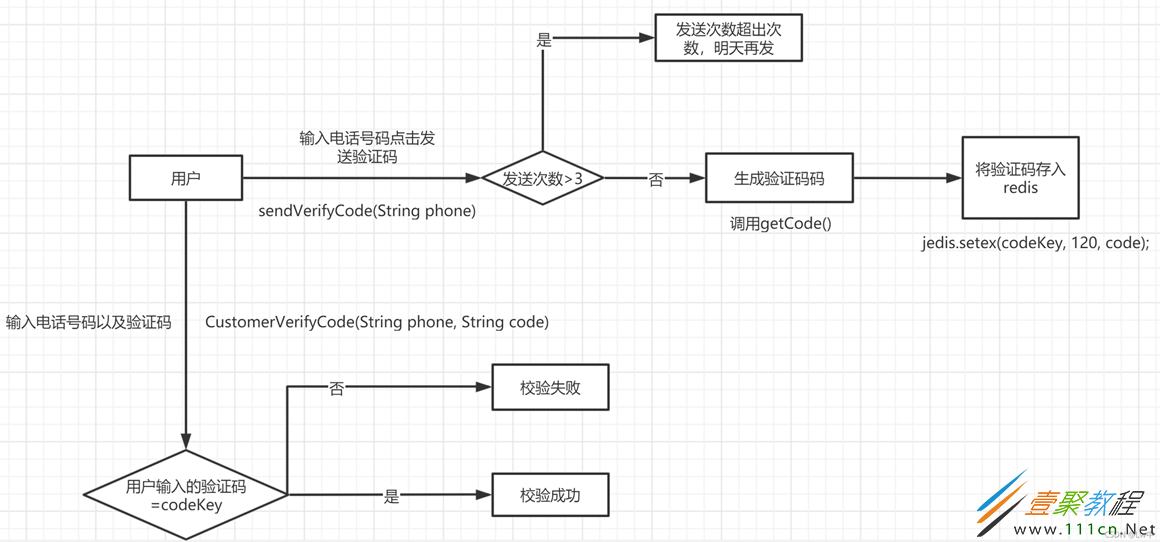
一:添加jedis依赖包

二:测试连接Redis服务是否成功
// 创建Jedis对象用于连接Redis服务(在服务器上通过redis-server需要指定配置文件:redis-server /etc/redis.conf)
Jedis jedis = new Jedis("192.168.119.128", 6379);
String value = jedis.ping();
System.out.println(value);
jedis.close();
三:编写生成验证码方法
/**
     * 生成验证码的方法
     * @return code
     */
    public static String getCode() {
        Random random = new Random();
        String code = "";
        for (int i = 0; i

	四:编写发送验证码方法

/**
     * 用户点击生成验证码并将其添加到redis中
     * @param phone
     */
    public static void sendVerifyCode(String phone) {
        Jedis jedis = new Jedis("192.168.119.128", 6379);

        // 手机号码的key,获取手机号码发送验证码次数
        String countKey = "VerifyCode" + phone + ":count";
        // 验证码的key,获取手机号码的验证码
        String codeKey = "VerifyCode" + phone + ":code";

        // 获取countKey判断当前手机号码是否可以发送验证码
        String count = jedis.get(countKey);
        if (count == null) {
            jedis.setex(countKey, 24 * 60 * 60, "1");
        } else if (Integer.parseInt(count)  2) {
            System.out.println("当前手机号发送验证码次数超过上限,请明天再发送验证码");
            jedis.close();
        }

        String code = getCode();
        jedis.setex(codeKey, 120, code);

        jedis.close();
    }

	五:编写校验验证码方法

/**
     * 用户输入手机号以及验证码进行校验
     * @param phone
     * @param code
     */
    public static void CustomerVerifyCode(String phone, String code) {
        Jedis jedis = new Jedis("192.168.119.128", 6379);

        String codeKey = "VerifyCode" + phone + ":code";
        String phoneVerifyCode = jedis.get(codeKey);

        if (phoneVerifyCode.equals(code)) {
            System.out.println("校验成功!");
        } else {
            System.out.println("校验失败!");
        }

        jedis.close();
    }